# Magic Editor X: full documentation
> README.md and AGENTS.md of magic-editor-x in one file.
> Source: https://github.com/Schero94/Magic-Editor-X
# Magic Editor X
Block editor for Strapi 5: an [Editor.js](https://editorjs.io/) custom field with Media Library uploads, custom blocks, templates, tables with merged cells, math and footnotes, comments on blocks and on selected text with @mentions, block suggestions, version history, an audit trail, live collaboration across several servers, rendered Content API and GraphQL output, React and Vue components, and optional AI and grammar assistants that use your own provider. Free and open source under the MIT license.
[](https://www.npmjs.com/package/magic-editor-x)
[](https://www.npmjs.com/package/magic-editor-x)
[](https://github.com/Schero94/Magic-Editor-X/actions/workflows/release.yml?query=branch%3Amain)
[](https://github.com/Schero94/Magic-Editor-X/blob/main/LICENSE)
[](https://github.com/Schero94/Magic-Editor-X#compatibility)
[](https://schero94.github.io/Magic-Editor-X/)
Live docs:
[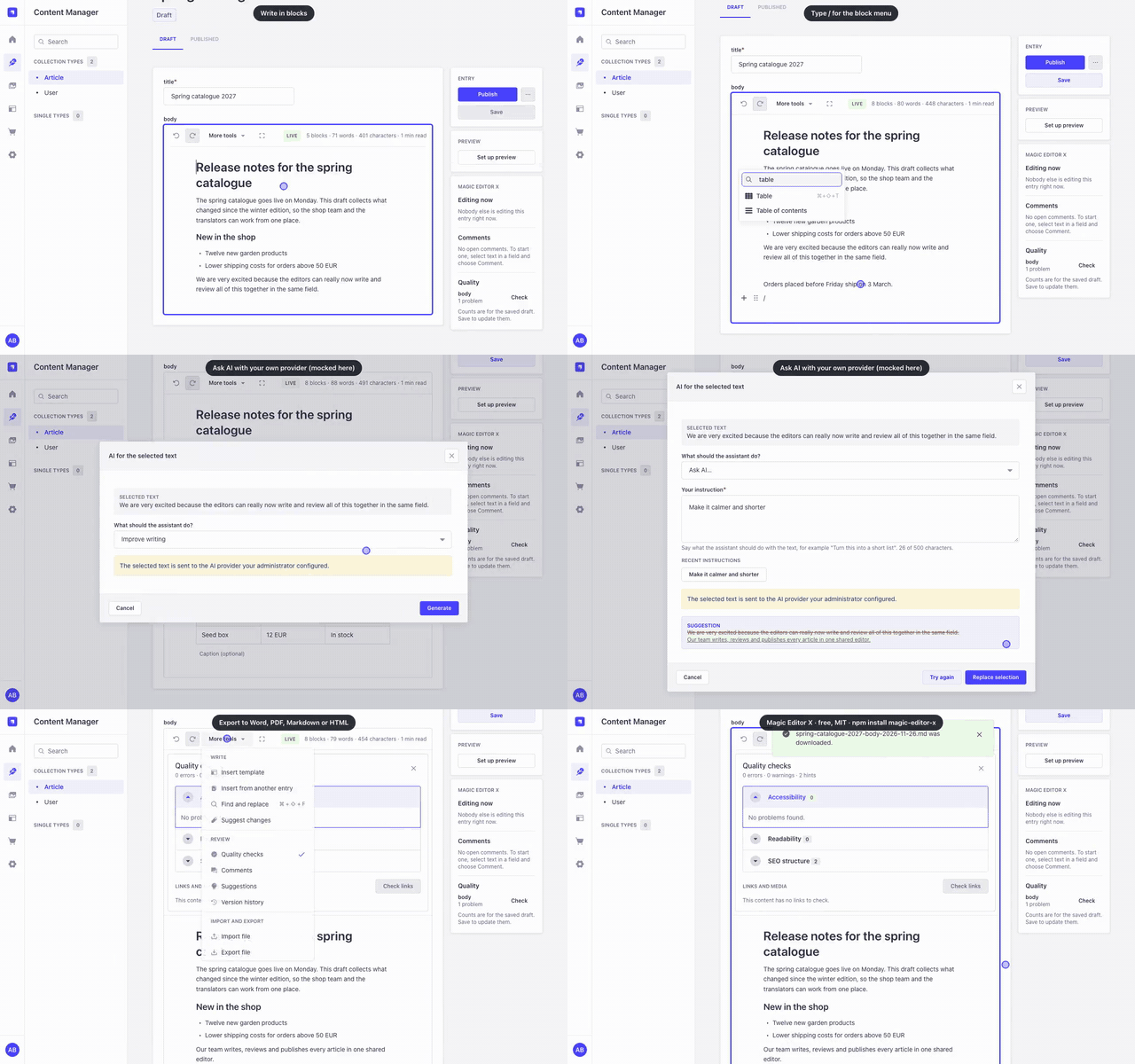](https://schero94.github.io/Magic-Editor-X/#demo)
The animation above plays the [35-second demo](https://schero94.github.io/Magic-Editor-X/#demo) at double speed (the AI answer in it comes from a local mock provider). If Magic Editor X is useful to you, a [star on GitHub](https://github.com/Schero94/Magic-Editor-X) helps other Strapi developers find it.
## Contents
- [Getting started in 3 steps](#getting-started-in-3-steps)
- [Features](#features)
- [Screenshots](#screenshots)
- [Core concepts](#core-concepts)
- [Screens](#screens)
- [How Magic Editor X compares](#how-magic-editor-x-compares)
- [Performance and touch](#performance-and-touch)
- [Compatibility](#compatibility)
- [Install](#install)
- [Configuration](#configuration)
- [Live collaboration](#live-collaboration)
- [Running several instances](#running-several-instances)
- [AI assistant](#ai-assistant)
- [Grammar check (LanguageTool)](#grammar-check-languagetool)
- [Field presets](#field-presets)
- [Writing tools](#writing-tools)
- [Templates, patterns and synced blocks](#templates-patterns-and-synced-blocks)
- [Comments](#comments)
- [Suggestions](#suggestions)
- [Paste, import and migration](#paste-import-and-migration)
- [Import and export files (2.11)](#import-and-export-files-211)
- [Version history](#version-history)
- [Edit in Media Library (crop and focus)](#edit-in-media-library-crop-and-focus)
- [Quality checks](#quality-checks)
- [Audit trail](#audit-trail)
- [Working together and reusing content (2.5)](#working-together-and-reusing-content-25)
- [Component blocks, columns and Live Preview (2.6)](#component-blocks-columns-and-live-preview-26)
- [Data format](#data-format)
- [TypeScript types per field](#typescript-types-per-field)
- [Rendering content](#rendering-content)
- [Content API and GraphQL output](#content-api-and-graphql-output)
- [Custom blocks in code (SDK)](#custom-blocks-in-code-sdk)
- [Core Blocks bridge](#core-blocks-bridge)
- [Strapi AI translations and Releases](#strapi-ai-translations-and-releases)
- [Admin API and permissions](#admin-api-and-permissions)
- [Security and privacy](#security-and-privacy)
- [Troubleshooting](#troubleshooting)
- [Upgrading from 2.6](#upgrading-from-26)
- [Upgrading from 2.5](#upgrading-from-25)
- [Upgrading from 2.4](#upgrading-from-24)
- [Upgrading from 2.3](#upgrading-from-23)
- [Upgrading from 2.2](#upgrading-from-22)
- [Migrating from 1.x](#migrating-from-1x)
- [Development and tests](#development-and-tests)
- [Maintenance status](#maintenance-status)
- [Languages](#languages)
- [Showcase your company](#showcase-your-company)
- [License](#license)
## Getting started in 3 steps
For editors who open an entry with a Magic Editor X field for the first time:
1. **Write.** Click into the field and type. Press **+** at the start of an empty line, or type **/**, to add a heading, list, image, table or any other block. Select text to make it bold, add a link or start a comment.
2. **Find the extras.** Everything beyond writing is in one place: **More tools** above the field (Review: comments, history, quality, suggestions; Write: AI, templates, insert from another entry; View: preview, focus, shortcuts). A block's own menu (**⋮⋮** next to it) moves, copies or changes that block.
3. **Save.** Use **Save** in the Content Manager as usual. The **Magic Editor X** panel next to the entry shows who else is editing it, open comments and quality problems. If your browser crashes before you save, the field offers your unsaved changes back the next time you open the entry.
## Features
Every feature is available in every installation. There is nothing to activate, no tiers and no usage limits. The plugin makes outgoing requests only for link previews, images and media by URL, the external link check and the AI provider and LanguageTool server the owner configured, and only when someone uses one of these features (see [Security and privacy](#security-and-privacy)). Mention e-mails, when the owner turns them on, go through your own Strapi email plugin.
- **Custom field** `plugin::magic-editor-x.richtext` (stored as JSON) for collection types, single types, components and dynamic zones, including localised fields and Draft & Publish.
- **Block tools** (block name in brackets, the same names 1.x used):
- text: paragraph (`paragraph`), heading H1 to H6 (`header`), list with nesting, ordered and unordered (`list`), checklist (`checklist`), quote (`quote`), warning (`warning`), alert in eight colours (`alert`), collapsible toggle (`toggle`), delimiter (`delimiter`), table with header row and column, alignment, merged cells and a caption (`table`), formula in TeX (`math`, 2.4);
- structure: table of contents built from the headings, with stable anchors (`toc`), synced block that shows shared content edited in one place (`synced`, see [Templates, patterns and synced blocks](#templates-patterns-and-synced-blocks));
- code: plain code (`code`), code with syntax highlighting and an optional file name (`codeFlask`; Prism with plain text, JavaScript, TypeScript, JSX, TSX, JSON, HTML/XML, CSS, SCSS, Shell, Python, PHP, Ruby, Java, Kotlin, Swift, C#, C, C++, Go, Rust, SQL, GraphQL, YAML, Markdown, Dockerfile and diff);
- media: image upload by file or URL into the Media Library (`image`, with alternative text and a focal point), picking images from the Media Library (`mediaLib`, inserts `image` blocks), image by URL without upload (`simpleImage`), gallery of Media Library images as grid or carousel (`gallery`), video and audio from the Media Library with captions and WebVTT tracks (`video`, `audio`), file attachments (`attaches`), embeds such as YouTube, Vimeo, CodePen, GitHub, Figma and others (`embed`);
- other: link preview card (`linkTool`), person card (`personality`), call-to-action button (`button`), raw HTML (`raw`).
- **Inline tools:** bold, italic, link with target and rel (`hyperlink`, with a built-in picker that links an entry of your content types, see [Internal links](#internal-links)), mention of an entry (`mention`, Ctrl/Cmd+Shift+2, or type `@`), inline formula (`inlineMath`, Ctrl/Cmd+Shift+E), footnote (`footnote`, Ctrl/Cmd+Alt+F), marker, underline, strikethrough, inline code, tooltip, and the AI assistant when it is enabled.
- **Block tunes:** alignment (`alignmentTune`), text variant call-out / citation / details (`textVariant`), indent (`indentTune`).
- **Field presets:** per field in the Content-Type Builder: allowed blocks and heading levels, character and block limits, required alternative text, allowed links, AI and live collaboration on or off, publishing guard. Enforced on every save and over the live channel, not only in the editor. See [Field presets](#field-presets).
- **Writing:** Markdown shortcuts (`#`, `-`, `1.`, `[]`, `>`, ` ``` `, `---`, `**bold**`, `_italic_`, `~~strike~~`, `` `code` ``), find and replace, keyboard shortcut help, focus mode, actions for several selected blocks, counts with reading time, a rendered preview of the field (Ctrl/Cmd+Alt+P), undo and redo, drag and drop, full screen. The field toolbar shows undo, redo, a **More tools** menu and full screen; everything else is in the menu. See [Writing tools](#writing-tools).
- **Templates, patterns and synced blocks:** reusable starting content and block sequences per field or preset, inserted from the editor toolbar, and synced blocks that every field shows from one source. See [Templates, patterns and synced blocks](#templates-patterns-and-synced-blocks).
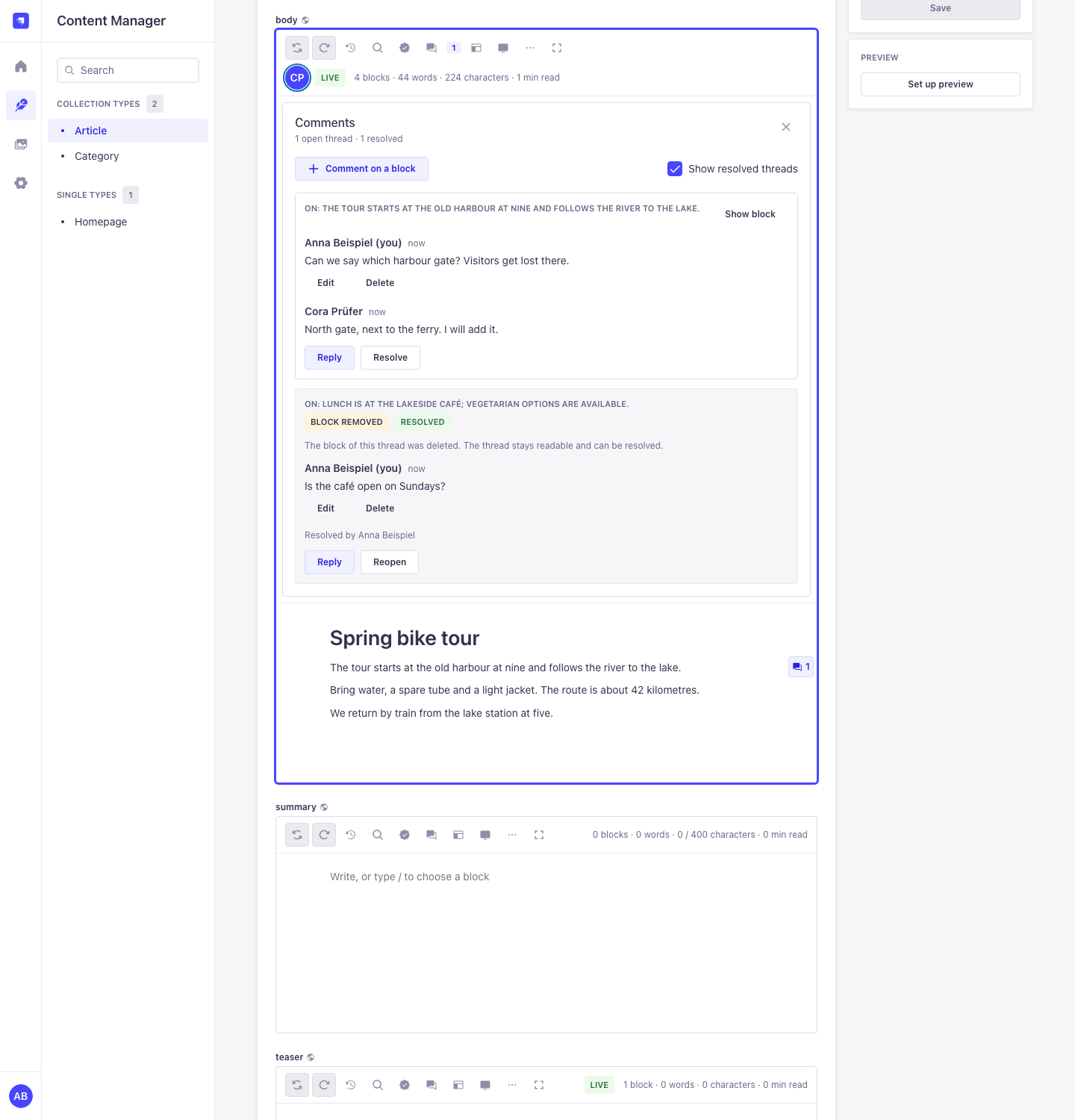
- **Comments:** threads on single blocks or on selected text, with replies, resolve and reopen, @mentions of colleagues, a "Mentions and replies" widget on the admin home page and optional e-mails, for editors and read-only reviewers, with their own permissions. See [Comments](#comments).
- **Suggestions:** reviewers propose block changes in a separate copy of the field; editors accept or reject each one. See [Suggestions](#suggestions).
- **Paste and import:** Word, Google Docs, LibreOffice, web pages and Markdown become real blocks (tables keep merged cells, header cells and alignment; videos and audio from the web are copied into the Media Library); a CLI migrates Strapi Blocks, Markdown and HTML fields. See [Paste, import and migration](#paste-import-and-migration).
- **Import and export files (2.11):** **More tools > Import file** turns a Word document (.docx) or a Markdown file into blocks, with a preview, then replaces the content or inserts it at the cursor. **More tools > Export file** saves the field as Word (.docx), PDF (through the browser's print dialog), Markdown or HTML. Both run in the browser. See [Import and export files](#import-and-export-files-211).
- **Media:** alternative text and "decorative image" on image blocks and gallery images, a focal point that frontends keep visible when they crop; images keep their Media Library id and responsive formats. On Strapi 5.54+ an image block opens its file in the Media Library to crop it and set its focus, and takes the cropped file back when you return (2.12, see [Edit in Media Library](#edit-in-media-library-crop-and-focus)).
- **Quality checks:** accessibility lint (alternative texts, heading order, link texts, table headers, contrast of custom colours, videos without captions, empty tables of contents), readability and SEO-structure hints (sentence and paragraph length, a reading score for English, German and Spanish, passive voice, headings, internal links, length and an optional focus keyphrase), one-click **Fix** for safe findings, a link check and an optional scheduled check of every external link, with an optional publishing guard. See [Quality checks](#quality-checks).
- **Renderers, schema and types:** `magic-editor-x/render` (HTML, plain text, Markdown; framework-free and XSS-safe), React and Vue components (`magic-editor-x/react`, `magic-editor-x/vue`), guides for React, Vue/Nuxt and Astro, `magic-editor-x/schema` (JSON Schema) and `magic-editor-x/types` (TypeScript), plus `npx magic-editor-x types` for types of the blocks each of your fields allows. See [Rendering content](#rendering-content) and [TypeScript types per field](#typescript-types-per-field).
- **Content API and GraphQL output:** `?mex=html|text|markdown|json` on Content API requests and `Rendered` / `Resolved` in GraphQL, with internal links, mentions, embedded entries, media and synced blocks resolved with the caller's permissions. See [Content API and GraphQL output](#content-api-and-graphql-output).
- **Custom blocks:** define your own blocks in Settings: simple blocks with fields (text, textarea, URL, number, select, checkbox, image, colour) and an optional HTML template, or embedded-entry blocks that link an entry of another content type. Import and export as JSON. Blocks that need code (own editor UI, strict data rules, own output) are defined once with the block SDK; see [Custom blocks in code (SDK)](#custom-blocks-in-code-sdk).
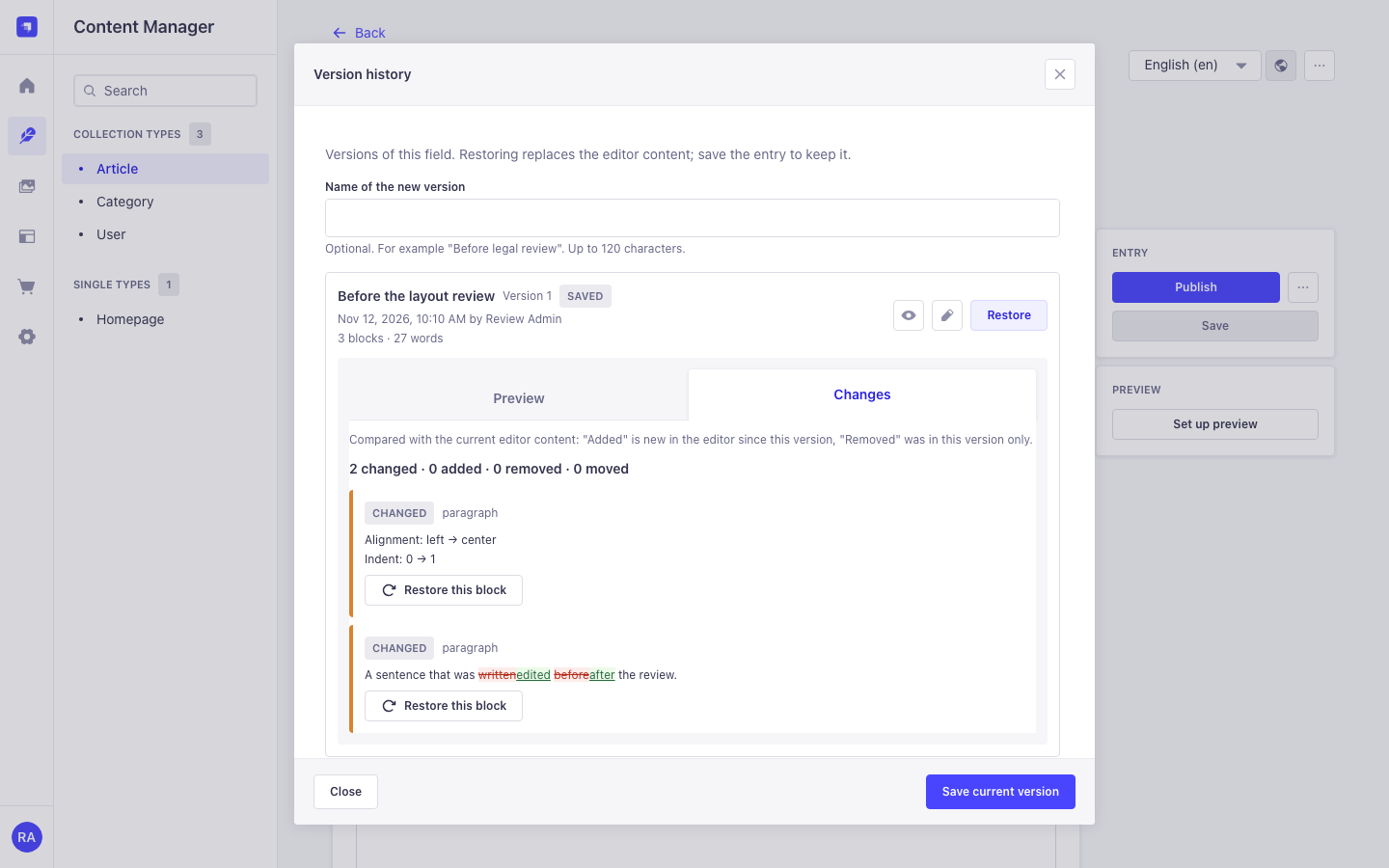
- **Version history:** named versions, a word-level comparison with the current content (tune changes shown as "Alignment: left → center"), restore of the whole field or a single block; automatic versions during live sessions. **Changes since last publish** (2.12) marks added, changed and removed blocks in the editor against the published version, with a word-level diff per block (see [Changes since last publish](#changes-since-last-publish)). Fields inside repeatable components and dynamic zones have their own history (2.4). Synced block sources keep versions too.
- **Audit trail:** who changed which field, version, comment, template or setting, and when, with counts and block ids but never the content. See [Audit trail](#audit-trail).
- **Live collaboration:** several admins edit the same field at the same time with character-level merging, presence avatars and read-only viewers. Works with several Node processes behind a load balancer without sticky sessions.
- **AI assistant:** improve, fix grammar, shorten, expand, summarize, simplify, translate, change tone and continue writing, using Anthropic, OpenAI or any OpenAI-compatible server (for example a local model) with your own key, on selected text or on selected blocks. Optional, each behind its own owner switch: alternative text suggestions for images and translate or summarize a whole field. See [AI assistant](#ai-assistant).
- **Grammar check:** spelling and grammar of a whole field with a LanguageTool server (self-hosted or hosted), off until the owner turns it on. See [Grammar check (LanguageTool)](#grammar-check-languagetool).
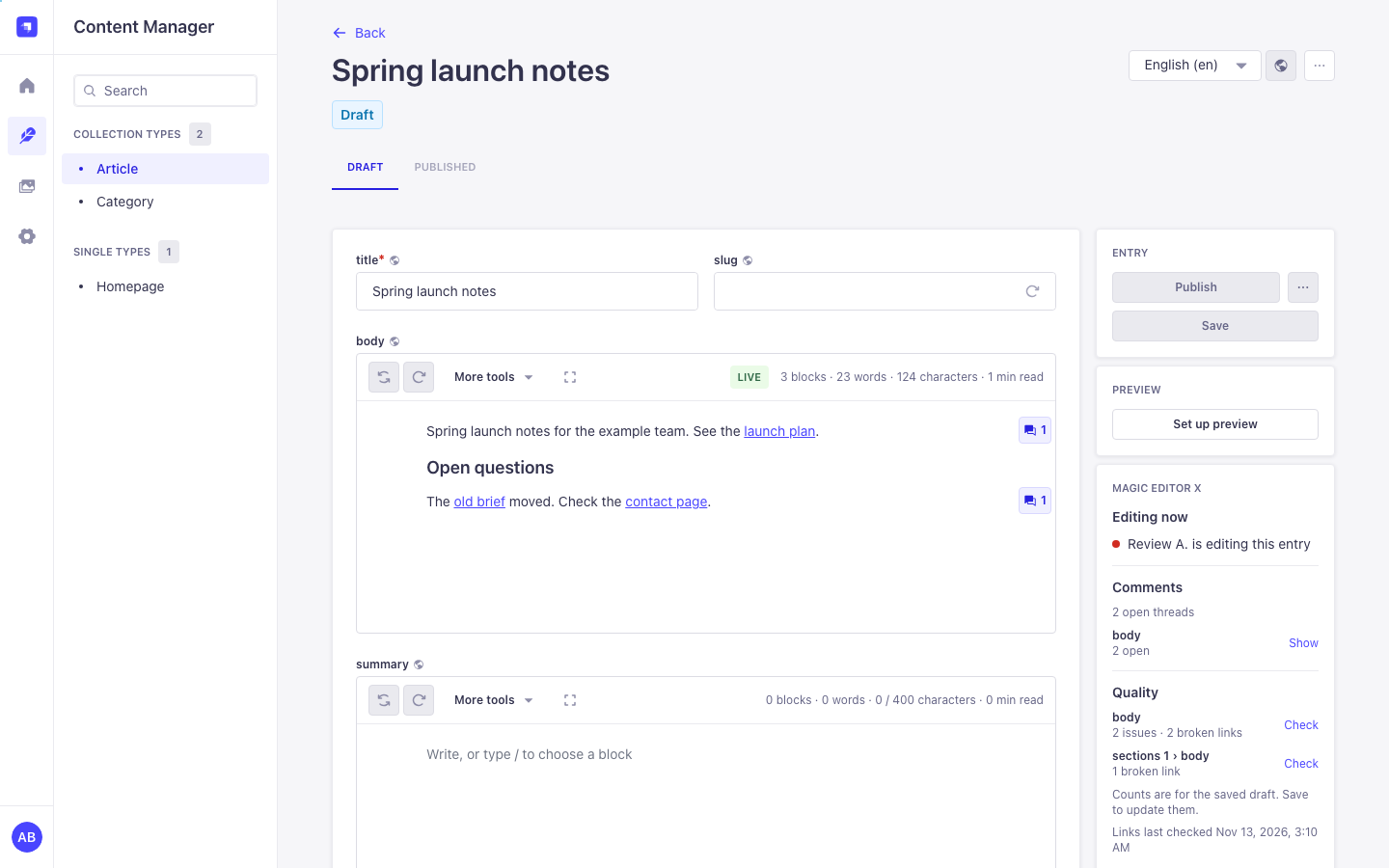
- **Entry panel (2.5):** a Magic Editor X panel next to every entry shows who else is editing it, open comment threads and quality problems per field; optional soft lock that asks once before you edit an entry someone else is editing. Homepage widgets "My open threads" and "Broken links".
- **Unsaved work is kept (2.5):** unsaved field content stays in your browser and is offered back after a reload, crash, closed tab or ended session.
- **Reuse (2.5):** insert blocks from another entry, field or language with a preview, and copy blocks between fields with everything they contain.
- **Many fields (2.5):** fields start only when they come near the screen, so long entries open fast.
- **Colours from your palette (2.5):** text colour and highlight from named tokens you define (no free colours, no inline styles), superscript and subscript, and inline annotations such as abbreviations. All off until a field turns them on.
- **Private upload providers (2.5):** files of private storage (for example a private S3 bucket) are signed on every read and never stored signed. Drop files onto a field to upload and insert them.
- **Tools for AI clients (2.5):** optional tools, preset schemas and a content guide for Strapi's MCP server.
- **Component blocks (2.6):** Content-Type Builder components as blocks inside a field, with a form checked while typing and on save. Off until a field lists components. See [Component blocks, columns and Live Preview (2.6)](#component-blocks-columns-and-live-preview-26).
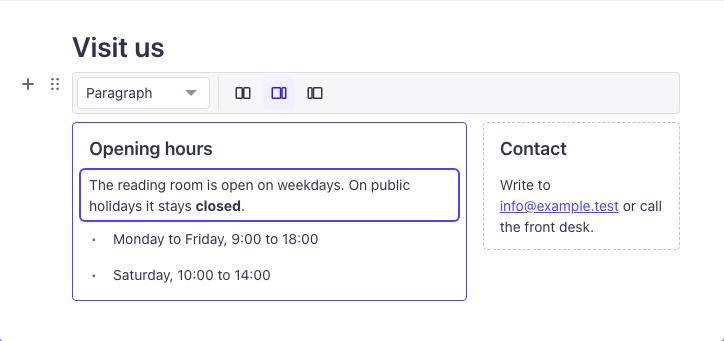
- **Columns (2.6):** 2 or 3 columns of paragraphs, headings and lists that stack on narrow screens; live editing, undo, comments, AI and every renderer included.
- **Live Preview (2.6):** a click on a block in Strapi's preview opens the entry with the caret in that block; renderers can mark blocks for the preview.
- **Strapi-native admin:** built with the Strapi Design System, light and dark mode, keyboard accessible, admin in English, German, French, Spanish and Portuguese.
- **Safe content:** every value is normalised and sanitised on the server when it is saved, from the Content Manager, the Content API or code.
- **Strapi AI translations and Releases:** Strapi's AI translation sends only the text of Magic Editor X fields and rebuilds other locales from the source structure; Releases show entries the publishing guard would refuse as not ready. See [Strapi AI translations and Releases](#strapi-ai-translations-and-releases).
## Screenshots
| | |
| ------------------------------------------------------------------------------------------------------------------------------------------------------------------------- | ------------------------------------------------------------------------------------------------------------------------------------------------------------------ |
| 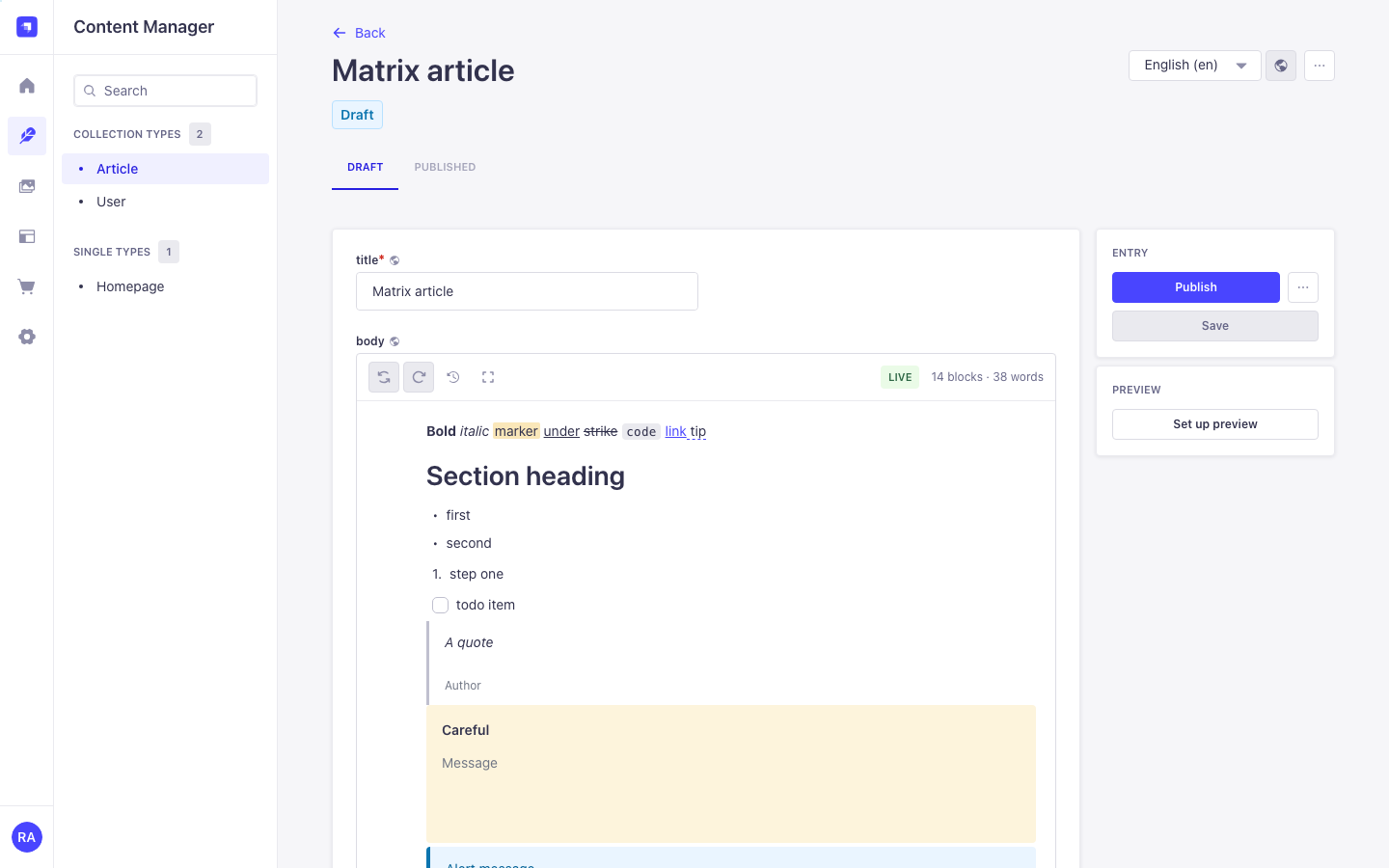 | 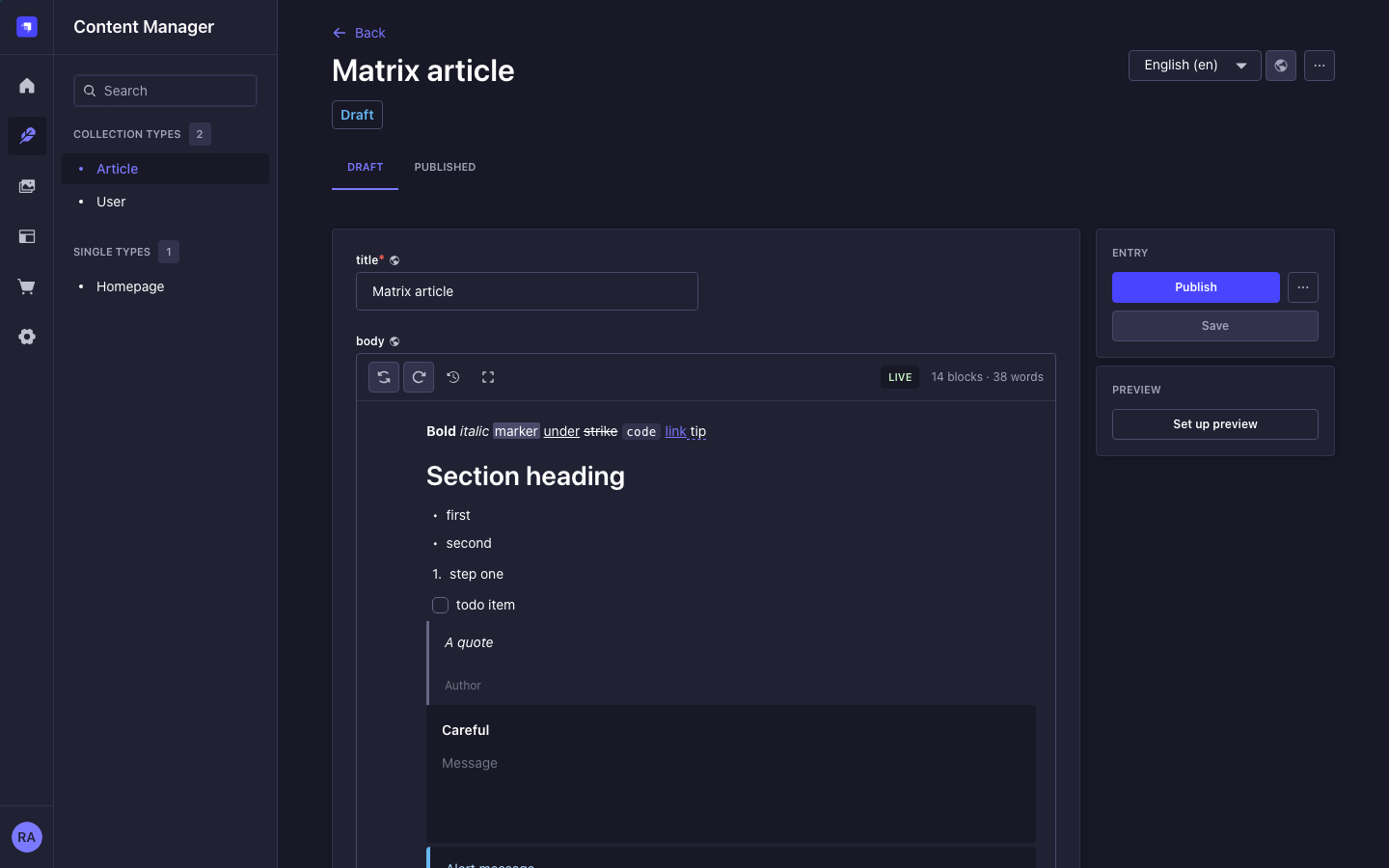 |
| 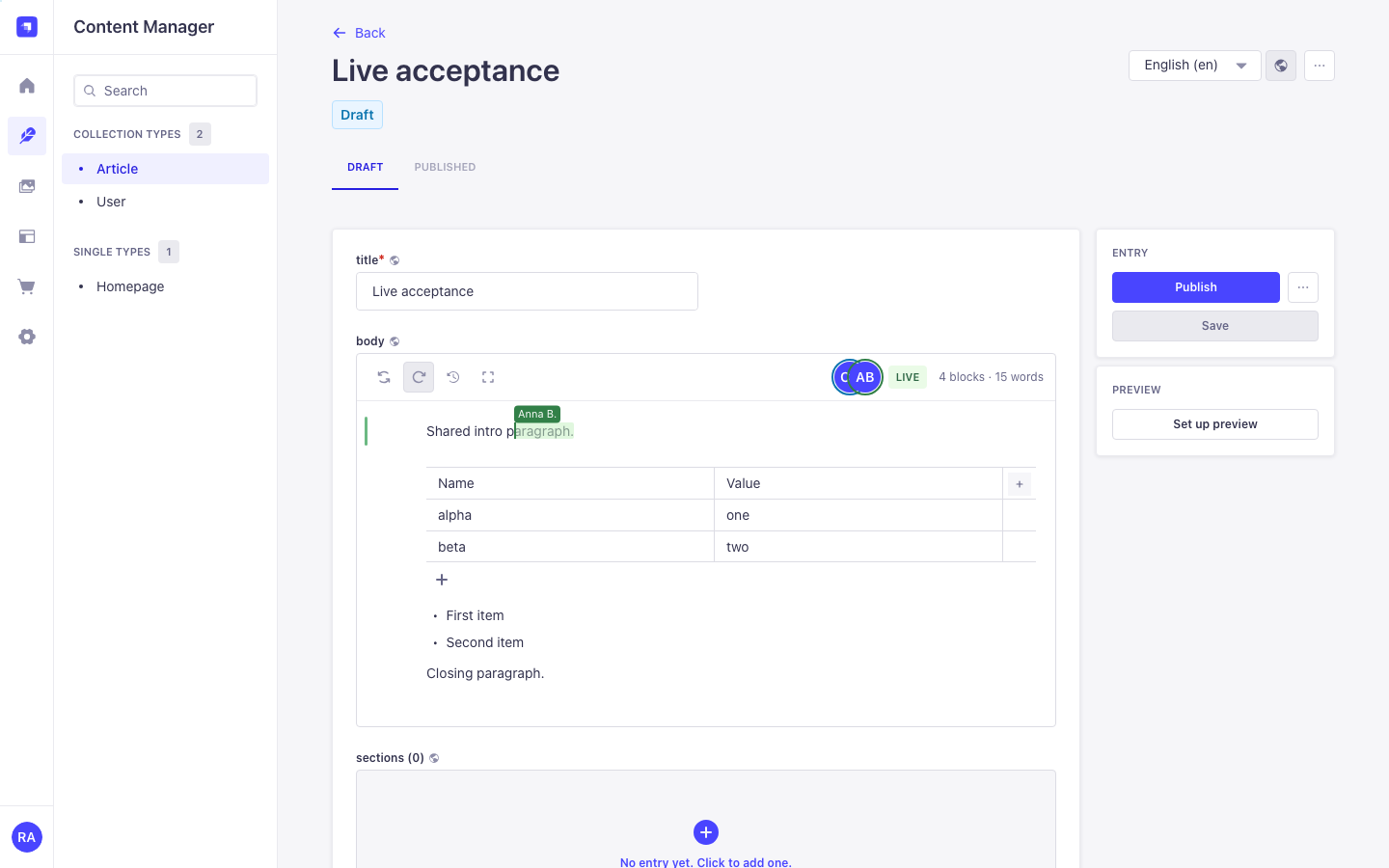 |  |
|  |  |
|  | 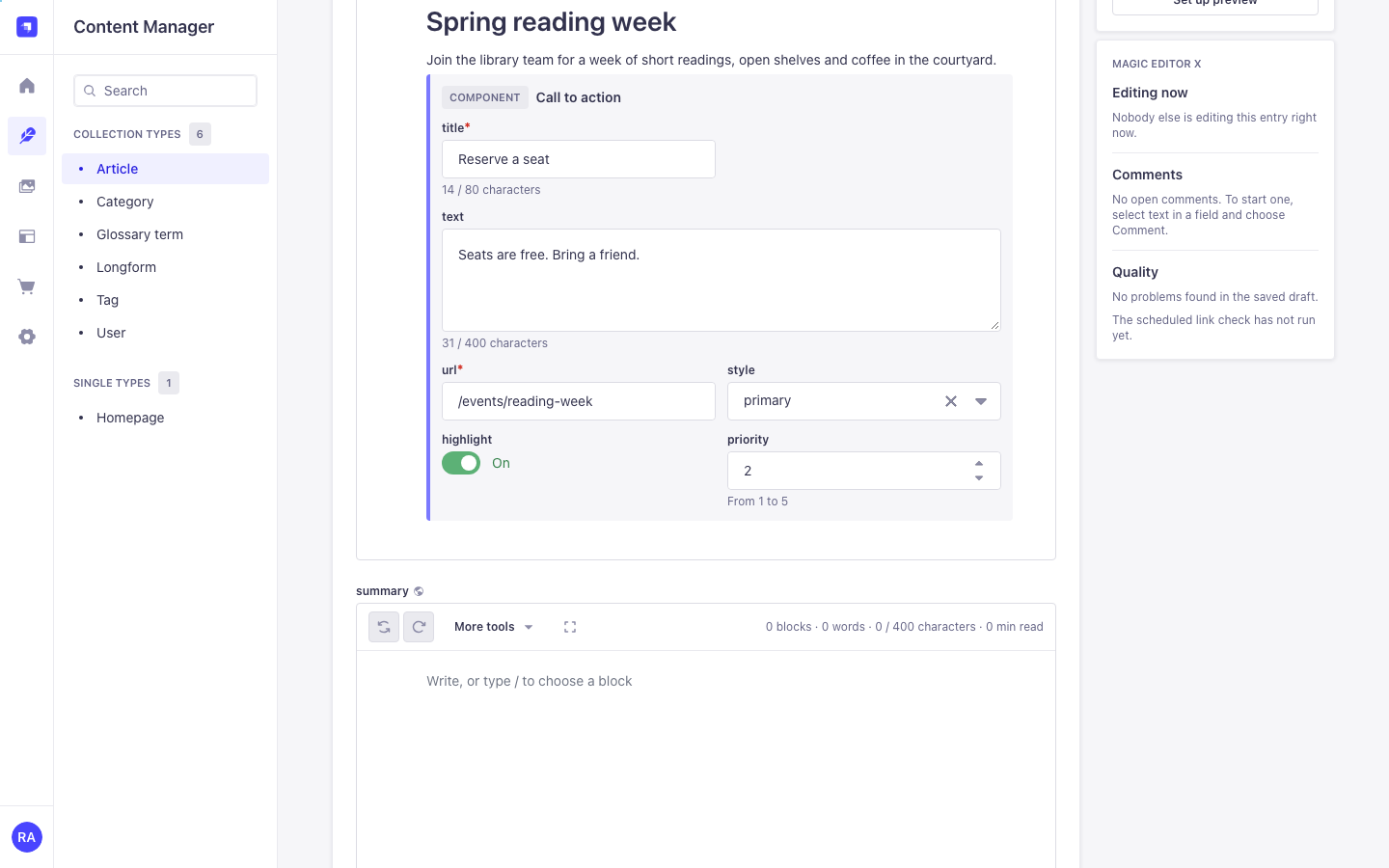 |
All screenshots use synthetic data (captured on Strapi 5.61.1 and 5.62.0; acceptance host: Strapi 5.63.0). Every screen, from tables, math and footnotes to suggestions, templates and the AI assistant, is in the [full gallery on the docs site](https://schero94.github.io/Magic-Editor-X/#screens).
## Core concepts
| Term | Meaning |
| ------------ | --------------------------------------------------------------------------------------------------------------------------------------------------------- |
| Field | One Magic Editor X attribute of a content type or component. Its value is an Editor.js document. |
| Block | One entry of the document's `blocks` array, for example a paragraph or an image. Each block has an `id`, a `type` (the block name) and `data`. |
| Custom block | A block type defined in Settings > Magic Editor X > Custom blocks, or in code with the block SDK. Its name becomes the block `type`. |
| Template | Starting content for a field. Inserting it replaces the field content. |
| Pattern | A group of blocks that editors insert anywhere in a field. |
| Synced block | Shared content edited once in Settings > Magic Editor X > Templates. A field stores only a reference (`{ ref }`) and shows the current source content. |
| Thread | A comment and its replies on one block, or on a passage of text in one block, of one field, document and locale. Threads are not part of the field value. |
| Suggestion | One proposed change of one block (changed, new or removed), waiting for an editor to accept or reject it. Suggestions are not part of the field value. |
| Field key | A random `fieldKey` that a value inside a repeatable component or dynamic zone carries, so history, comments and live rooms follow that entry (2.4). |
| Version | A stored copy (snapshot) of one field of one document in one locale, listed in the version history. |
| Room | The live editing session of one field of one document in one locale. A room exists while people edit and for `collaboration.roomTtlMinutes` afterwards. |
| Viewer | Someone in a room who can read the document but not update it. Viewers see changes live but cannot type. |
## Screens
| Screen | Where | Who can open it |
| ------------------------------ | --------------------------------------------------------------------------------------------------------------------------- | ---------------------------------------------------------------------------------------------------------------------------------------------------------------- |
| Editor field | Content Manager, edit view | Everyone who can read the field. Uploads, version history and the AI assistant need the permissions in [Admin API and permissions](#admin-api-and-permissions). |
| Version history | More tools > Version history, for a saved document | `access` and Content Manager read on the document; saving, naming and restoring need update. The Activity tab needs `audit.read`. |
| Find and replace | More tools > Find and replace, or Ctrl/Cmd+Shift+F in the editor | Everyone who can read the field; replacing needs update. |
| Quality checks | More tools > Quality checks (the number counts problems) | Everyone who can read the field; the link check needs `access`. |
| Keyboard shortcuts, focus mode | More tools > Keyboard shortcuts or Focus mode, or Ctrl/Cmd+Alt+/ | Everyone who can read the field. |
| Field options | Content-Type Builder, Magic Editor X field, Basic and Advanced settings | Content-Type Builder access (development mode). |
| AI assistant | Inline toolbar (select text), or a block's menu, the block selection bar or Ctrl/Cmd+Shift+G for whole blocks | `access` and `ai.use`, when an administrator turned the assistant on. |
| AI for the whole field | More tools > AI for the whole field | `access` and `ai.use`, when the owner allowed whole-field AI actions and the field does not turn AI off. |
| Comments panel | More tools > Comments (shows the open-thread count), a block's comment marker, or Comment on selected text (Ctrl/Cmd+Alt+M) | `access`, `comments.read` and Content Manager read on the document; writing and mentioning need `comments.write`, deleting others' comments `comments.moderate`. |
| Insert template | More tools > Insert template | `access` and Content Manager read on the type; "Save content as template" and "Save as pattern" need `templates.manage`. |
| Preview | More tools > Preview, or Ctrl/Cmd+Alt+P | Everyone who can read the field, read-only users included. |
| Grammar check | More tools > Check grammar | `access` and `grammar.use`, when the owner turned LanguageTool on. |
| Suggestions panel | More tools > Suggestions, a block's suggestion marker, or "Review suggestions" under the field | `access`, `suggestions.create` or `suggestions.review` and Content Manager read; accepting and rejecting need `suggestions.review` and update. |
| Suggest mode | More tools > Suggest changes, or "Suggest changes" under a field you cannot edit | `access`, `suggestions.create` and Content Manager read. |
| Mentions and replies | Widget on the admin home page | `access` and `comments.read`. |
| Configuration | Settings > Magic Editor X > Configuration | `settings.read` (view), `settings.update` (edit). |
| Custom blocks | Settings > Magic Editor X > Custom blocks | `custom-blocks.manage`. |
| Templates | Settings > Magic Editor X > Templates (templates, patterns and synced blocks, with versions of synced blocks) | `templates.manage`. |
| Audit trail | Settings > Magic Editor X > Audit trail | `audit.read` and `settings.read`. |
## How Magic Editor X compares
Magic Editor X is free under the MIT license, and every feature below works in every installation. CKEditor 5 and TinyMCE sell collaboration, history and AI as paid plans or add-ons, and Strapi's own Blocks field has fewer block types. The table compares what each product documents. Competitor facts were checked against the linked vendor pages **as of 2026-11**; plans and prices change, so follow the links before you decide. "Not documented" means the vendor pages we checked say nothing either way. TinyMCE's page lists some features as included on its plan cards and as add-ons in its comparison table; this table follows the comparison table.
| Feature | Magic Editor X (MIT, free) | CKEditor 5 (paid plans) | TinyMCE (paid plans) | Strapi Blocks field and Strapi plans |
| ----------------------------------- | ---------------------------------------------------------------------------------------------------------------------------------------------------------------------------------------------------------------------------------------------------------------------- | --------------------------------------------------------------------------------------------------------------------------------------------------------------------------------------------------------------------------------------------------------------------------- | --------------------------------------------------------------------------------------------------------------------------------------------------------------------------------------------------------------------------- | ------------------------------------------------------------------------------------------------------------------------------------------------------------------------------------------------------------------------- |
| License and cost | MIT. No plans, add-ons or usage limits. | GPL 2+ for self-hosted open-source projects, or paid plans: Essential $144/month and Professional $289/month billed annually, with editor-load limits ([pricing](https://ckeditor.com/pricing/)) | GPL 2+ open source, or paid plans: Essential $79/month and Professional $145/month billed annually, with editor-load limits ([pricing](https://www.tiny.cloud/pricing/)) | The Blocks field is part of every Strapi edition. Content History and Strapi AI need the Growth or Enterprise plan (see below). |
| Real-time co-editing | Yes, character-level, across several Node processes without sticky sessions | Add-on to Professional ($249/month billed annually) or included in Custom ([pricing](https://ckeditor.com/pricing/)) | The real-time collaboration plugin was retired on 31 December 2023 ([notice](https://www.tiny.cloud/docs/tinymce/6/rtc-introduction/)) | Not documented |
| Comments on selected text | Yes, with replies, @mentions and optional e-mails | Add-on to Professional, or Custom ([pricing](https://ckeditor.com/pricing/)) | Professional and Enterprise ([pricing](https://www.tiny.cloud/pricing/)) | Not documented ([Content Manager](https://docs.strapi.io/cms/features/content-manager)) |
| Suggestions and track changes | **Block-level only:** a suggestion replaces, inserts or deletes a whole block and is accepted or rejected per block | Track changes, add-on to Professional, or Custom ([pricing](https://ckeditor.com/pricing/)) | Suggested Edits, add-on to Professional ($79/month) or Enterprise ([pricing](https://www.tiny.cloud/pricing/)) | Not documented |
| Version history | Named and automatic versions, word-level comparison, restore the field or one block; blocks changed since the last publish are marked in the editor (2.12) | Revision history, add-on to Professional, or Custom ([pricing](https://ckeditor.com/pricing/)) | Revision History, add-on to Professional or Enterprise ([pricing](https://www.tiny.cloud/pricing/)) | Content History on Growth (14 days) and Enterprise (30 to 90 days). The docs describe viewing and restoring a version, not a comparison ([Content History](https://docs.strapi.io/cms/features/content-history)) |
| AI writing help | With your own key: Anthropic, OpenAI or an OpenAI-compatible server such as a local model. Built-in actions, "Ask AI…" with your own instruction, owner-defined actions with a style guide, and AI review that adds suggestions | CKEditor AI, add-on from Essential ($133/month billed annually) ([pricing](https://ckeditor.com/pricing/)) | TinyMCE AI, add-on from Essential ($133/month) ([pricing](https://www.tiny.cloud/pricing/)) | Strapi AI (translations, alt text and captions in the Media Library, a Content-Type Builder assistant), included in Growth, a paid add-on on Enterprise ([Strapi AI](https://docs.strapi.io/cms/ai/for-content-managers)) |
| Tables | Header row and column, alignment, merged cells, caption. **Cells hold inline text only** (no lists or images, because Editor.js has no nested blocks) | Yes ([features](https://ckeditor.com/docs/ckeditor5/latest/features/index.html)) | Yes ([plugins](https://www.tiny.cloud/docs/tinymce/latest/plugins/)) | No. The Blocks validator accepts paragraph, heading, quote, list, image and code ([source](https://github.com/strapi/strapi/blob/develop/packages/core/core/src/services/entity-validator/blocks-validator.ts)) |
| Word and Google Docs content | Paste from Word, Google Docs, LibreOffice and web pages into blocks. Import .docx and Markdown files with a preview; export Word (.docx), PDF (browser print), Markdown and HTML, without quotas | Enhanced paste from Office from Essential; Import from Word from Professional; Export to Word and PDF on every plan with monthly quotas ([pricing](https://ckeditor.com/pricing/)) | PowerPaste from Professional; Import from Word and Export to Word or PDF as usage add-ons ([pricing](https://www.tiny.cloud/pricing/)) | Not documented |
| Image crop | **No crop inside the editor.** On Strapi 5.54+ the image block opens the file in Strapi's Media Library (Crop & Focus) and takes the cropped file and its focus back (2.12) | Not documented | Image Editing from Essential ([pricing](https://www.tiny.cloud/pricing/)) | The Media Library's Crop & Focus area editor crops, rotates and sets a focus area, free since Strapi 5.54 ([Media Library](https://docs.strapi.io/cms/features/media-library)) |
| Accessibility checks of the content | 15 rules (alternative text, heading order, link text, table headers, contrast and more) with an optional publishing guard | Not documented | Accessibility Checker from Professional ([pricing](https://www.tiny.cloud/pricing/)) | Not documented |
| Readability and SEO hints | Deterministic rules in the browser, free: sentence and paragraph length, reading score (en, de, es), passive voice (en, de), headings, internal links, length, focus keyphrase; one-click Fix for safe findings | AI Review (grammar, style, tone, clarity) on selected paid plans; no readability score or SEO checks documented ([CKEditor AI](https://ckeditor.com/docs/ckeditor5/latest/features/ai/ckeditor-ai-overview.html)) | TinyMCE AI review "Improve readability" on paid subscriptions; no SEO checks documented ([TinyMCE AI](https://www.tiny.cloud/docs/tinymce/latest/tinymceai/)) | Not documented ([Content Manager](https://docs.strapi.io/cms/features/content-manager)) |
| Long documents and touch devices | Measured on every pull request: at 2,000 blocks a key press is painted in 16 ms (p95) and panels open in under 0.1 s on an Apple M3 Pro; touch checks in Pixel 7 and iPhone 13 emulation ([numbers](#performance-and-touch)). Not measured on real phones or in Safari | Android and iOS browsers (all vendor-supported versions) are officially supported; the page gives no figures for long documents ([support policy](https://ckeditor.com/docs/ckeditor5/latest/updating/technology-upgrades-policy.html#supported-browsers-and-environments)) | Mobile on the latest two releases of Android (Chrome) and iOS (Safari), with features listed as limited on mobile; no figures for long documents ([mobile](https://www.tiny.cloud/docs/tinymce/latest/tinymce-for-mobile/)) | Not documented ([Content Manager](https://docs.strapi.io/cms/features/content-manager)) |
Two headless CMS editors outside Strapi, for orientation:
| Product | Facts as of 2026-11 |
| ------------------------ | -------------------------------------------------------------------------------------------------------------------------------------------------------------------------------------------------------------------------------------------------------------------------------------------------------------------------------------------------------------------------------------------------------------------------------------------- |
| Payload (Lexical editor) | Multiplayer editing is announced under Payload for Enterprise but not available yet ([page](https://payloadcms.com/enterprise/multi-player-editing)). The table feature is `EXPERIMENTAL_TableFeature` and is not on by default ([features](https://payloadcms.com/docs/rich-text/official-features)). Upload collections have a crop tool and a focal point selector in the admin ([uploads](https://payloadcms.com/docs/upload/overview)). |
| Sanity (Portable Text) | Studio has real-time multiplayer editing with character-level sync ([Studio](https://www.sanity.io/studio)). Comments, including comments on words and sentences in Portable Text, are a Growth plan feature ([Comments](https://www.sanity.io/docs/studio/comments)). Images can have crop and hotspot tools (`hotspot: true`) ([image type](https://www.sanity.io/docs/studio/image-type)). |
### Other Strapi editor plugins
The table above compares editor products and their paid plans. For the choice between Strapi plugins, [Strapi editor plugins compared](https://schero94.github.io/Magic-Editor-X/compare.html) puts Magic Editor X next to Strapi Blocks, the community CKEditor plugin (`@_sh/strapi-plugin-ckeditor`), the official CKEditor plugin (`@ckeditor/strapi-plugin-ckeditor`, needs a CKEditor licence key), Tiptap by Notum (`@notum-cz/strapi-plugin-tiptap-editor`), Better Blocks (`@qkix/strapi-plugin-better-blocks`) and TinyMCE by SKLINET (`@sklinet/strapi-plugin-tinymce`), with a source link per claim (checked 2026-11-26). In short, the others are the better choice in these cases:
- **Strapi Blocks** for simple formatted text: nothing to install, maintained by Strapi.
- **CKEditor 5** for Word-like editing with HTML output; its table cells can hold lists and headings and can nest tables. The community plugin is free under GPL and is by far the most used Strapi editor plugin (about 32,000 npm downloads a week).
- **Better Blocks** to keep the Strapi Blocks JSON format while adding tables, callouts and math. Magic Editor X stores Editor.js JSON and converts Blocks fields with a one-way `migrate` command.
**Where Magic Editor X is weaker.** These limits come from the engine, or the feature is not built yet:
- Suggestions work on whole blocks. A reviewer cannot suggest a change to a few words inside a block, because Editor.js 2.x keeps no change marks in saved data and every block tool owns its own markup ([engine decision](https://github.com/Schero94/Magic-Editor-X/blob/main/docs/engine-decision.md)).
- Table cells and columns hold inline text and simple items only. Editor.js has no nested blocks.
- There is no crop or rotate inside the editor. The image block opens the asset in Strapi's Media Library (Strapi 5.54+ with the new Media Library, not on private upload providers); cropping there replaces the file everywhere it is used.
- AI review lands as block suggestions, so it inherits the block-level limit above: one suggestion replaces a whole block.
- Word import does not bring images (a placeholder marks each one; add it with the image tool), and Word styles beyond headings, lists, tables, quotes, code and text marks are dropped. PDF export goes through the browser's print dialog ("Save as PDF"); there is no server-side PDF file.
- Readability and SEO hints are heuristics: syllables are counted by rule, so reading scores are estimates; there is a reading score for English, German and Spanish only and a passive-voice hint for English and German only. There is no AI-written meta description.
- Touch support is measured in Chromium device emulation (Pixel 7, iPhone 13), not on real phones or in Safari. Editor.js has no touch drag and drop: blocks move with Move up and Move down in the block menu. Above 2,000 blocks a new block (Enter) takes about 0.1 s, because Editor.js checks every block on each change (see [Performance and touch](#performance-and-touch)).
## Performance and touch
Measured with `npm run bench:browser` (2026-11-25): the packed plugin in a Strapi 5.63 host, headless Chromium 159 on an Apple M3 Pro, an entry with synthetic text blocks (paragraphs, headings, nested lists, quotes, code, tables), published and then edited, with "Changes since last publish" on. Before = 2.12.0, after = this release.
| At 2,000 blocks | Before | After | Budget |
| ------------------------------------------------- | --------------- | ----------- | --------------- |
| Load until the editor is ready | 1.5 s | 1.3 s | 3 s |
| Key press to next paint, p50 / p95 | 40 / 68 ms | 7 / 16 ms | p95 50 ms |
| Long tasks while typing (300 keys) | 7, up to 108 ms | none | none over 50 ms |
| Enter to the new block, p95 | 79 ms | 56 ms | 150 ms |
| Paste 200 blocks | 6.7 s | 0.18 s | 1 s |
| More tools opens | 1.5 s | 34 ms | 100 ms |
| Quality / Comments / Version history / Find opens | 1.5 to 2.9 s | 61 to 88 ms | 100 ms |
| JS heap after 1,000 key presses (after GC) | +7.9 MB | +5.0 MB | +30 MB |
At 5,000 blocks (the field's limit) typing went from p95 180 ms with 119 long tasks (up to 638 ms) to p95 24 ms with none, panels from 10 to 22 s to 0.14 to 0.2 s and loading from 3.4 to 2.2 s; at 1,000 blocks typing is p95 13 ms and panels open in about 55 ms. The CI job `browser-bench` runs the same measures on every pull request and prints them in the job summary; a GitHub runner is about 1.5 to 2 times slower (at 2,000 blocks: typing p95 12 ms, panels 85 to 160 ms, load 2.9 s), so timing budgets are reported there, not enforced. The JS heap was measured after forced garbage collection: the caches of 2.8.2 are capped and the heap stays flat while typing.
What made the difference (2.12.1): live regions inside blocks made every menu and dialog of the Design System hide each block from screen readers one by one, which Editor.js answered with work for every block and every change; blocks outside the viewport are no longer laid out (`content-visibility`); the indent tune no longer measures the page for every block it styles; in long documents the field saves in typing pauses; the problem count on More tools waits until typing pauses.
**Touch.** Checked in Chromium emulation of a Pixel 7 and an iPhone 13: a tap places the caret, the "+" toolbox, the block menu (with Move up and Move down), the inline toolbar, table editing and More tools work by tap; on phones the panels open as a bottom sheet over the text and the version history dialog fits the screen; full screen editing and the sheets stay above the on-screen keyboard; every button of the field, its sheets and dialogs is at least 44 px on touch screens (the comment, suggestion and change markers beside the text keep 32 px); the page never scrolls sideways; scrolling through 2,000 blocks had no long task. Not covered: real phones, Safari on iOS (WebKit), long-press text selection and drag and drop by touch (Editor.js has no touch dragging; use Move up and Move down).
## Compatibility
| Plugin | Strapi | Node | Notes |
| ------ | ------------------------------------------------------------------------------------- | ---------------------------------- | --------------------------------------------------------------------------------------------------------------------------- |
| 2.x | 5.38 or later (CI builds and tests 5.38.0 and 5.63.0; acceptance host: Strapi 5.63.0) | 22.12 or later (CI: 22, 24 and 26) | SQLite, PostgreSQL and MySQL/MariaDB through the Strapi database connection. Acceptance runs used SQLite and PostgreSQL 16. |
| 1.x | 5.x | 22 | No longer developed. |
- `engines.node` is `>=22.12.0 <=26.x.x` (2.5 declares the floor that sanitize-html 2.18 already required since 2.4.0); the 2.3 to 2.5 test runs used Node 22.23.1.
- The admin uses the React, React Router, react-intl, styled-components and Design System versions of the Strapi admin (React 18, Design System 2.2.4 in Strapi 5.61, 2.3.1 in 5.62 and 5.63).
- Dropping files onto a field uses the Media Library drop zone that Strapi registers from 5.61; with an older Strapi or the legacy Media Library (`useLegacyMediaLibrary`) Editor.js keeps its own file drop.
- Console messages you may see in the admin that come from Strapi itself, not from the plugin: the `useRBAC` deprecation warning, React Router future-flag warnings, the styled-components warning about an unknown prop `attribute` (development mode only; it also appears on an edit view without any Magic Editor X field, because the Content Manager passes each field's `attribute` to its own inputs; checked on Strapi 5.63.0), and the upgrade check to api.github.com when outgoing requests are blocked.
- The editor uses Editor.js 2.31.7. Editor.js 2.32.0 is still a release candidate on npm (`2.32.0-rc.3` on the `next` tag, checked 2026-11-12) and is not used. Why the plugin stays on Editor.js is explained in [docs/engine-decision.md](https://github.com/Schero94/Magic-Editor-X/blob/main/docs/engine-decision.md).
- Formulas are rendered with Temml 0.14 (MIT), loaded by the admin only when a field shows math.
- `magic-editor-x/react` works with React 18 and 19 (peer `^18.0.0 || ^19.0.0`), in the browser and in server rendering, including React Server Components.
- `magic-editor-x/vue` needs Vue 3.5 or later (optional peer `^3.5.0`; it is never installed by the plugin).
- `magic-editor-x/render` and `magic-editor-x/blocks` have no dependencies and no Node built-ins, so they run in Node, browsers and edge runtimes.
- The GraphQL fields need `@strapi/plugin-graphql`; without it nothing is registered.
## Install
```bash
npm install magic-editor-x
```
Enable the plugin in `config/plugins.ts` (or `config/plugins.js`):
```ts
export default ({ env }) => ({
'magic-editor-x': {
enabled: true,
config: {
// optional, see Configuration
},
},
});
```
Then rebuild the admin and restart:
```bash
npm run build
npm run develop
```
Add the field in the Content-Type Builder: **Add another field > Custom > Magic Editor X**. In its settings you can set a placeholder, a preset and the other [field presets](#field-presets), and a minimum height (120 to 2000 px).
After the first start, Super Admins can use everything. Other roles need the plugin actions listed in [Admin API and permissions](#admin-api-and-permissions) (Settings > Administration Panel > Roles > Plugins > Magic Editor X).
## Configuration
### Reference
All keys are optional. Infrastructure options live in `config/plugins`; the AI provider is edited at runtime in Settings > Magic Editor X > Configuration.
| Key | Type | Default | Effect |
| --------------------------------------------------------- | ---------------------------------------- | ------------------------------------------------------------------------------------------------- | ----------------------------------------------------------------------------------------------------------------------------------------------------------------------------------------------------------------------------------------------------------------------------------------------------------------------------------------------------------------------------------- |
| `debug` | boolean | `false` | Writes debug log lines (never content or personal data). |
| `rawHtml` | `'sanitize'` \| `'allow'` \| `'disable'` | `'sanitize'` | Raw HTML block on save: `sanitize` removes scripts, event handlers, iframes and unsafe URLs; `allow` stores the HTML as typed; `disable` empties it. |
| `sanitizeOnSave` | boolean | `true` | Normalise and sanitise Magic Editor X values on every Document Service write. Turning this off is not recommended. |
| `encryptionKey` | string (32+ characters) | unset | Key for the stored AI provider key. Prefer the `MAGIC_EDITOR_X_ENCRYPTION_KEY` environment variable. |
| `uploads.maxImageBytes` | integer | `10485760` (10 MiB) | Largest image accepted by file or URL (hard cap 500 MiB). |
| `uploads.maxFileBytes` | integer | `20971520` (20 MiB) | Largest attachment. |
| `uploads.maxMediaBytes` | integer | `52428800` (50 MiB) | Largest video or audio file copied from a pasted URL (`POST /magic-editor-x/media/byUrl`, 2.4; hard cap 200 MiB). WebVTT tracks are capped at 512 KiB. |
| `uploads.allowPrivateOrigins` | string[] | `[]` | Exact origins (for example `http://media.intranet.example.test:9000`) that images and media by URL may fetch although they resolve to a private address (2.4). Redirects from them are never followed; the connection is pinned to the resolved address, and link-local and cloud metadata addresses stay refused (400), also when a listed host name resolves to them. At most 20. |
| `linkPreview.enabled` | boolean | `true` | Link preview cards. When `false`, `GET /magic-editor-x/link` answers 404. |
| `linkPreview.timeoutMs` | integer | `8000` | Time limit for fetching a page (1000 to 30000). |
| `api.autoParseJSON` | boolean | `true` | Turn 1.x JSON strings of Magic Editor X fields into objects in Content API GET responses (only those fields, found by the content-type schema). |
| `ai.allowPrivateBaseUrl` | boolean | `false` | Allow AI base URLs on loopback or private networks (for local models). Owner decision; not editable in the admin. |
| `ai.apiKey` | string | unset | Provider key from the environment. When set it wins over a key stored in the settings, but only for the base URL it is configured for (`ai.apiKeyBaseUrl`). |
| `ai.apiKeyBaseUrl` | http(s) URL | unset (the official Anthropic and OpenAI APIs) | Base URL the `ai.apiKey` key is sent to, for example `https://llm.example.com` for a proxy or self-hosted server. When the settings point at another base URL, the key is not sent there; an admin has to enter a key for that endpoint (it is then stored encrypted). |
| `ai.requestsPerMinute` | integer | `20` | AI requests per admin per minute, shared by all processes. |
| `ai.timeoutMs` | integer | `60000` | Time limit for one provider request. |
| `ai.altText` | object | `{ allowPrivateOrigins: [] }` | Alternative text suggestions (2.4); key below. |
| `ai.altText.allowPrivateOrigins` | string[] | `[]` | Exact origins of private image storage (for example a MinIO host in your network) that alt text suggestions may read images from. One DNS lookup, pinned connection, no redirects; link-local and cloud metadata addresses are refused even when listed. At most 20, checked at startup. |
| `languageTool.allowPrivateBaseUrl` | boolean | `false` | Allow a LanguageTool base URL on loopback or private networks (self-hosted server in the LAN). Owner decision. |
| `languageTool.requestsPerMinute` | integer | `30` | Grammar checks per admin per minute, shared by all processes. |
| `languageTool.timeoutMs` | integer | `20000` | Time limit for one LanguageTool request. |
| `collaboration.enabled` | boolean | `true` | Live collaboration and its Socket.IO server. |
| `collaboration.path` | string | `'/magic-editor-x/realtime'` | Socket.IO path on the Strapi HTTP server. |
| `collaboration.allowedOrigins` | string[] | `[]` | Extra browser origins allowed to open the socket. The admin URL and the server URL are always allowed. |
| `collaboration.pollIntervalMs` | integer | `400` | How often each process reads updates written by other processes (50 to 10000). |
| `collaboration.roomTtlMinutes` | integer | `30` | Keep a room's live state this long after the last person left. |
| `collaboration.maxMessageBytes` | integer | `2097152` (2 MiB) | Largest accepted socket message. |
| `collaboration.snapshotIntervalMinutes` | integer | `10` | Automatic version while people edit live. `0` turns it off. |
| `collaboration.tokenTtlSeconds` | integer | `60` | Lifetime of the one-time token that opens the socket. |
| `collaboration.maxConnectionsPerAdmin` | integer | `20` | Open live sockets per admin across all processes. |
| `collaboration.maxRoomsPerAdmin` | integer | `20` | Different fields one admin may have open live at the same time, across all processes. |
| `collaboration.revalidateSeconds` | integer | `60` | Full permission re-check of open sockets. Role, permission and user changes are applied within about a second anyway. |
| `collaboration.rateLimit` | object | `{ sessionsPerMinute: 60, updatesPer10s: 300, bytesPer10s: 8388608 }` | Session tokens per admin and minute (shared by all processes), updates and update bytes per socket in 10 seconds. |
| `collaboration.compaction` | object | `{ enabled: true, idleSeconds: 60, minBytes: 262144, ratio: 4, checkIntervalSeconds: 30 }` | Rebuilds an idle room whose live state is `ratio` times larger than a fresh copy (and at least `minBytes`) as a new generation, once across all processes. Open editors switch without reconnecting; edits that had not reached the server yet are kept. Bounds: `idleSeconds` 15 to 86400, `minBytes` 1 KiB to 512 MiB, `ratio` 1.5 to 1000, `checkIntervalSeconds` 1 to 3600. |
| `history.maxSnapshotsPerField` | integer | `50` | Versions kept per field and locale; older ones are deleted. |
| `comments.enabled` | boolean | `true` | Block comments in the editor. `false` hides them and the comment routes answer 404. |
| `comments.perMinute` | integer | `30` | New comments and replies one admin may post per minute, shared by all processes (1 to 1000). |
| `comments.mentionsPerMinute` | integer | `60` | Searches of the @mention picker per admin and minute, shared by all processes (2.4). |
| `comments.notifications` | object | `{ email: false, emailPerHour: 10 }` | Mention e-mails (2.4); keys below. In-app notifications are always on. |
| `comments.notifications.email` | boolean | `false` | E-mail people when they are mentioned, through the Strapi email plugin. The e-mail names who mentioned them and the entry, never the comment text. |
| `comments.notifications.emailPerHour` | integer | `10` | Mention e-mails per recipient and hour. |
| `suggestions.enabled` | boolean | `true` | Block suggestions (2.4). The UI appears only for roles with `suggestions.create` or `suggestions.review`, which no role has until you grant them. `false` hides them and the routes answer 404. |
| `suggestions.perMinute` | integer | `20` | Times one admin may send suggestions per minute (each send carries 1 to 50 block suggestions), shared by all processes. | |
| `links.urlPattern` | string | `''` | `href` of internal links, for example `'/{locale}/{collection}/{slug}'` or `'https://www.example.com/{collection}/{documentId}'`. Placeholders: `{documentId}`, `{locale}`, `{slug}`, `{collection}`, `{singular}`. Empty means `'/{collection}/{documentId}'`. See [Internal links](#internal-links). |
| `qualityChecks.externalLinks` | object | `{ enabled: false, timeoutMs: 5000, perMinute: 30 }` | External link check of the quality panel; keys below. |
| `qualityChecks.externalLinks.enabled` | boolean | `false` | Lets the quality panel check external links (outgoing requests through the SSRF-protected fetcher; owner opt-in). |
| `qualityChecks.externalLinks.timeoutMs` | integer | `5000` | Time limit per request and per redirect hop (1000 to 15000). |
| `qualityChecks.externalLinks.perMinute` | integer | `30` | External URLs one admin may check per minute, shared by all processes. |
| `qualityChecks.externalLinks.allowPrivateOrigins` | string[] | `[]` | Exact origins (for example an intranet host) that the link checks may reach although they resolve to a private address. Redirects from them are never followed. |
| `qualityChecks.externalLinks.schedule` | object | `{ enabled: false, rule: '0 3 * * *', maxUrlsPerRun: 500, perMinute: 60, perHostConcurrency: 2 }` | Scheduled check of every external link in all editor fields (needs `externalLinks.enabled`); keys below. |
| `qualityChecks.externalLinks.schedule.enabled` | boolean | `false` | Runs the scheduled check. One process in a cluster runs each check (lease). |
| `qualityChecks.externalLinks.schedule.rule` | string | `'0 3 * * *'` | Cron rule (in `schedule.tz`, else server time). |
| `qualityChecks.externalLinks.schedule.tz` | string | unset | IANA time zone of the rule, for example `'Europe/Berlin'` (2.4). Checked at startup. | |
| `qualityChecks.externalLinks.schedule.maxUrlsPerRun` | integer | `500` | Distinct URLs checked per run (1 to 10000). |
| `qualityChecks.externalLinks.schedule.perMinute` | integer | `60` | Requests per minute for the whole run (1 to 600). |
| `qualityChecks.externalLinks.schedule.perHostConcurrency` | integer | `2` | Requests in flight per host (1 to 8). |
| `audit.enabled` | boolean | `true` | Records the [audit trail](#audit-trail) (2.4). It holds no content. `false` stops recording and the extra reads it needs. |
| `audit.retentionDays` | integer | `180` | Days an audit event is kept (0 keeps everything, at most 3660). One process prunes once an hour. |
| `presence.enabled` | boolean | `true` | The Magic Editor X entry panel shows who else has the entry open (2.5). Names only, never e-mail addresses. Works without live collaboration. |
| `presence.softLock` | boolean | `false` | Asks once per tab before you edit an entry someone else is editing ("Continue editing"). Never blocks anyone (2.5). |
| `presence.perMinute` | integer | `30` | Presence requests per admin per minute, shared by all processes. |
| `mcp.enabled` | boolean | `false` | Registers the Magic Editor X tools, preset schemas and content guide with Strapi's MCP server. Strapi's own `server.mcp.enabled` must be on too (2.5). |
| `coreBlocks.enabled` | boolean | `false` | Core Blocks bridge: custom block types registered with `service('core-blocks').register()` pass Strapi's validation of the core Blocks field. The Settings switch overrides it once saved; turns itself off when Strapi supports custom blocks (2.7). |
| `reuse.enabled` | boolean | `true` | "Insert from another entry" in More tools > Write (2.5). |
| `reuse.perMinute` | integer | `60` | Requests of "Insert from another entry" per admin per minute. |
| `palette.colors` | `{ name, label, light, dark }[]` | `[]` | Named text colours editors may pick in fields with "Text colour and highlight" (2.5). `name` becomes the class `mex-color-`; `light`/`dark` are hex colours for the editor display and the contrast check. At most 24. |
| `palette.highlights` | `{ name, label, light, dark }[]` | `[]` | Named highlight colours (``, class `mex-highlight-`), same rules (2.5). Optional `palette.background` and `palette.text` (`{ light, dark }`) set the page colours the contrast check compares with. |
| `drafts.enabled` | boolean | `true` | Keeps unsaved field content in the admin's browser (IndexedDB) and offers it back after a reload, crash, closed tab or ended session: one notice with Restore or Discard (2.5). Removed on save, discard, expiry and logout. |
| `drafts.ttlHours` | integer | `72` | Lifetime of a local draft in hours (1 to 720). |
| `lazyInit.enabled` | boolean | `true` | Starts the editor and the live room of a field only when it comes near the screen or gets focus; until then the saved content is shown (2.5). |
| `lazyInit.marginPx` | integer | `800` | Distance above and below the screen at which a field starts (0 to 10000 CSS pixels). |
The validator rejects wrong types and ranges at startup and names the key, never the value. Keys from 1.x that no longer exist are ignored with a warning; see [Migrating from 1.x](#migrating-from-1x).
### Environment variables
| Name | Required | Default | Effect |
| ------------------------------- | ------------------------------------------------------- | ------- | --------------------------------------------------------------------------------------------------------------------------------------------------------------------------------------------------------------------------------------------------------------------------------------------------------------------------------------------------------------------------------------------------------------------- |
| `MAGIC_EDITOR_X_ENCRYPTION_KEY` | Only to store an AI or LanguageTool key in the settings | unset | 32 or more characters. Encrypts the AI provider key and the LanguageTool key (AES-256-GCM). Without it the settings page cannot store a key; you can still pass one with `ai.apiKey`. Generate one with `node -e "console.log(require('crypto').randomBytes(32).toString('base64'))"`. Keep it stable: a different key makes a stored provider key unreadable, and the settings page then asks you to enter it again. |
The plugin also uses Strapi's own `admin.auth.secret` (`ADMIN_JWT_SECRET`) to sign collaboration tokens. Every process of a cluster must use the same value.
### AI settings (admin)
Settings > Magic Editor X > Configuration stores these values in the Strapi store:
| Setting | Default | Range |
| --------------------------------------------------------- | ---------------------------------------------------------------------------------------------------------- | ------------------------------------------------------------------------------------------------------------------------------------------- |
| Enabled | off | |
| Provider | `anthropic` | `anthropic`, `openai`, `openai-compatible` |
| Base URL | provider default (`https://api.anthropic.com`, `https://api.openai.com`); required for `openai-compatible` | https, or private hosts when `ai.allowPrivateBaseUrl` is on |
| Model | `claude-opus-5-5` (Anthropic), `gpt-6-luna` (OpenAI) | letters, digits and `._:/@-` |
| API key | none | never returned; changing the provider or base URL requires entering it again |
| Max input characters | 8000 | 200 to 50000 |
| Max output tokens | 4096 | 64 to 16000 |
| Send images to the AI provider (`ai.allowImages`) | off | Allows alternative text suggestions; see [AI assistant](#ai-assistant) |
| Allow whole-field AI actions (`ai.allowFieldActions`) | off | Allows translate and summarize of a whole field |
| Your AI actions (`ai.actions`, 2.9) | none | up to 10; name, key, instruction, works on, result; see [Ask AI, AI review and your own actions](#ask-ai-ai-review-and-your-own-actions-29) |
| Style guide (`ai.styleGuide`, `ai.styleGuideForAll`, 2.9) | empty, off | up to 4000 characters; sent with the style guide review, or with every AI action when the switch is on |
The same page has a **Readability and SEO hints** section (2.9): turn the hints on or off, choose where the page heading comes from (the title field, so the content has no H1, which is the default; or the content's own H1), set the thresholds (minimum words 300, minimum internal links 1, sentence length 0 = language default, paragraph 150 words, section 300 words) and, per rule, whether it is shown and whether it blocks publishing in fields with `publishGuard`. See [Quality checks](#quality-checks). It also has a **Grammar check (LanguageTool)** section; see [Grammar check (LanguageTool)](#grammar-check-languagetool). It also shows the scheduled link check (rule, time zone, next run, last run, and **Run now** for admins with `settings.update`), the private image origins for alt text and whether mention e-mails are on, all read-only.
## Live collaboration
When a document has been saved once, the editor joins the room of its field. Everyone with Content Manager read access to that document, locale and field and the `collaborate` action can join; people with update access can type, others watch as viewers.
How it works:
- **Conflict-free structure.** The field is shared as a Yjs document in which every block has a stable id and every part of its data has its own shared type: texts merge character by character, and every table cell, list item, checklist entry, tune (alignment, text variant, indent) and custom block field is merged separately. Two people can edit different cells of one table, different items of one list, or the text and the alignment of one paragraph at the same time and both changes are kept. When two people change the same number, switch or option at the same moment, one value wins on every screen. The stored Editor.js JSON does not change.
- **Presence.** Avatars with first name and last initial (never e-mail addresses), coloured carets and selections of the others in the text, a coloured marker at the block someone is editing and an "away" state after a minute without activity or when the tab is hidden. Joins and leaves are announced politely to screen readers. Colours follow the light and dark theme; the caret does not blink when reduced motion is requested.
- **Connection state** in the toolbar: Connecting, Syncing, Live, Reconnecting, Offline, View only, or Live editing unavailable.
- **Offline and reconnects.** You can keep typing while the connection is gone. Unsent changes are kept, sent again after the reconnect and merged with what others did meanwhile, without duplicates. Reconnects use exponential backoff with jitter and a new one-time token; waking a laptop or returning to a tab reconnects at once. Closing the tab leaves the room immediately.
- **Undo and redo** (toolbar, Cmd/Ctrl+Z, Shift+Cmd/Ctrl+Z) only revert your own changes, never what others typed (the last 200 steps).
- **Saving.** Changes made by others become part of your form. Save, publish and discard work as usual. Version history restores into the live room, so everyone sees the restored content. Each locale has its own room.
- **Permissions** are checked when you join, re-checked within about a second when roles, permissions or users change (on every process), and every `collaboration.revalidateSeconds`. An admin who loses update access becomes a viewer; one who loses read access is disconnected.
- **Nothing typed is lost.** Edits are stored in the database before they are confirmed. When a room is cleaned up `collaboration.roomTtlMinutes` after the last person left and contains edits nobody saved, a version is created first, so they can be restored from the history.
Limits:
- A new entry that has not been saved yet has no room. A new section in a repeatable component or dynamic zone gets its room, history and comments after the entry is saved once; until then the toolbar says so.
- Text formatting (bold, links, …) is part of the text; two people formatting the same word at the same moment can produce nested tags, which the sanitiser keeps valid.
- Up to 5000 blocks per field (the stored-content limit); rooms above 64 MiB of history refuse further edits until they are compacted.
- Columns: moving an item to another column (fewer columns) keeps what others type into it at the same moment; when one person deletes an item that another moves, the delete wins. Cut and paste is not a move: cutting text and pasting it into another column removes the text and adds new text, so what someone types into the cut text at that moment is not carried over.
- After an update, editor tabs opened before it show "Reload the page to keep editing live" until they are reloaded.
- Several processes: run one version. During a rolling deploy, rooms that a process of the previous version still serves keep their old columns layout until that process is gone.
## Running several instances
Collaboration works with several Node processes and several machines that share one database, for example Railway with 2 replicas and pm2 with 4 processes each, behind a load balancer **without sticky sessions**. No Redis is needed.
How it works:
- The browser connects with the WebSocket transport only. A WebSocket connection is one long-lived request, so it does not need sticky routing. Your proxy must allow WebSocket upgrades on `collaboration.path` (default `/magic-editor-x/realtime`) and send them to Strapi.
- The session token is signed with a key derived from `admin.auth.secret`, so any process can accept a token issued by another one. All processes must use the same `ADMIN_JWT_SECRET`.
- Every update is written to the table `magic_editor_x_collab_updates` before it is acknowledged. Other processes read new rows every `collaboration.pollIntervalMs` and send them to their own sockets.
- Presence is stored in `magic_editor_x_collab_presence` with heartbeats; leases and one-time keys in `magic_editor_x_locks`. Seeding a room, compaction, automatic versions and cleanup each run once across all processes.
- Every process keeps the active rooms in memory, checks every update before it is stored (only the structures the editor uses, every dependency present, every touched block valid within the content limits) and relays it.
- Clients resynchronise their state every 20 seconds and after each reconnect, so a process restart or deploy loses nothing that was acknowledged.
- Permission changes set a signal in `magic_editor_x_locks` that every process checks every second. Session, AI, link check, comment and grammar check rate limits are counted in `magic_editor_x_counters`, so they apply to the whole cluster.
- Every process fires the scheduled link check; a one-time key and a lease in `magic_editor_x_locks` let exactly one process run it. Its results are stored in `magic_editor_x_link_fields` and `magic_editor_x_link_urls`.
- Comments are read from the database (polled every 15 seconds while the field is visible, 8 seconds with the panel open), so they appear on every process.
The plugin creates these tables on startup. They are not content types, so Strapi's schema sync leaves them alone. Comments, templates and versions are content types of the plugin, hidden from the Content Manager.
Behind a proxy, also set `server.proxy` in `config/server` (`koa: true` and the number of trusted hops in `maxIpsCount`) so Strapi sees the real client address.
The acceptance run with several processes is described in [CONTRIBUTING.md](https://github.com/Schero94/Magic-Editor-X/blob/main/CONTRIBUTING.md).
## AI assistant
The assistant is off until an administrator turns it on in Settings > Magic Editor X > Configuration and gives it a provider:
| Provider | Request | Default model (2026-11-11) |
| ------------------------------------------------------- | ----------------------------------------------------------------------------------- | -------------------------- |
| Anthropic | `POST {base}/v1/messages`, headers `x-api-key` and `anthropic-version: 2026-10-21` | `claude-opus-5-5` |
| OpenAI | `POST {base}/v1/chat/completions`, `Authorization: Bearer`, `max_completion_tokens` | `gpt-6-luna` |
| OpenAI-compatible (Ollama, vLLM, LM Studio and similar) | `POST {base}/v1/chat/completions`, optional bearer key, `max_tokens` | none; you name the model |
- The key stays on the server. It is encrypted at rest with `MAGIC_EDITOR_X_ENCRYPTION_KEY` or read from `ai.apiKey`, and it is never sent to the browser or written to logs.
- A key is only sent to the endpoint it is meant for. A stored key belongs to the provider and base URL it was saved with. The `ai.apiKey` key belongs to `ai.apiKeyBaseUrl`, or, when that is unset, to the official Anthropic and OpenAI APIs. Pointing the settings (or a connection test) at another base URL sends no key there until an admin enters one.
- The selected text (with its inline formatting) and a fixed instruction are sent to the provider. Nothing else from the document is sent. The text is never logged.
- Base URLs must be public https URLs. Loopback and private hosts are allowed only with `ai.allowPrivateBaseUrl: true` in `config/plugins`. Redirects are not followed.
- Input is limited by "Max input characters", output by "Max output tokens". Each admin can send `ai.requestsPerMinute` requests per minute; the counter is shared by all processes.
- The answer is sanitised to the inline tags the editor uses before it reaches the browser. The admin reviews the suggestion and chooses Replace selection; nothing changes before that.
### AI for selected blocks (2.4)
Select blocks and choose **AI for the selected blocks** in the selection bar, or open a block's menu and choose **AI assistant**, to rewrite, shorten, translate or change the tone of just those blocks (Ctrl/Cmd+Shift+G opens it for the selected blocks or the block with the caret). Only their text is sent, with its inline formatting and links; block ids, types, settings, images and URLs stay in the browser. You see the changes as a word diff before you apply them, and one Undo reverts them.
- Uses the same switch, permission (`ai.use`), rate limit and "Max input characters" as the assistant for selected text; it does not need "Allow whole-field AI actions". Fields with `disableAi` answer 403.
- The answer must return every text it was sent, exactly once, or nothing changes (502 `BAD_RESPONSE`). Each text is sanitised to the inline tools the field allows, and links that were not in the original are removed. When the blocks changed while the assistant worked, the dialog says so and applies nothing.
- Since 2.4 the assistant for selected text works the same way: the suggestion is limited to the field's inline tools, links the selection did not hold are removed, the dialog shows a word diff, and formatting the selection crossed is kept.
### Ask AI, AI review and your own actions (2.9)
Everything lives in the AI dialogs you already know (selected text, selected blocks, More tools > AI for the whole field) and in the Suggestions panel. New entries appear below the built-in actions, and only when they can work.
- **Ask AI…** (selected text and selected blocks): type your own instruction (up to 500 characters) and get the usual preview with a word diff; nothing changes until you apply it. Your last five instructions are offered as quick picks; they are kept in this browser only, per admin user (`localStorage`), and never sent anywhere else.
- **AI review** (selected text, selected blocks, whole field): **Proofread**, **Improve clarity** and **Check the style guide** do not edit. Each block the AI would change becomes a suggestion in the [Suggestions](#suggestions) panel, marked "AI, requested by …", which you accept or reject like any suggestion. Needs `ai.use` and `suggestions.create` (and Content Manager read on the entry). A review of selected text covers the blocks the selection is in; a whole-field review needs "Allow whole-field AI actions". At most 20 suggestions per run (the toast says when there were more), and an open suggestion with the same content for the same block version is never created twice, so running a review again adds nothing new. Proposals the field preset would refuse are dropped. The rate limits of AI requests (`ai.requestsPerMinute`) and of suggestions (`suggestions.perMinute`) both apply. In a live room the suggestions reach collaborators through the panel; accepting one goes through the room like any edit, and a block someone changed meanwhile shows as "Outdated".
- **Your own actions** (Settings > Magic Editor X > Configuration > AI actions and style guide > Your AI actions): up to 10 named instructions with a key, where they work (selected text, selected blocks or whole field) and the result (preview and replace, or suggestions). Editors see the name below the built-in actions; the instruction stays on the server and is never sent to the browser. Saved with the page like every setting and recorded in the audit trail as a count.
- **Style guide** (same page): up to 4000 characters of your rules. It is sent with **Check the style guide** (which only appears while a style guide is set) and, when **Send the style guide with every AI action** is on, with every text action.
- **Per field:** the field setting **AI actions in this field** (`aiActions`, see [Field presets](#field-presets)) lists the action keys a field offers, for example `improve, ask, proofread, seo-intro`. Empty offers every action. The server answers 403 for others.
Security: an instruction, an action's instruction and the style guide are untrusted text. Control and bidirectional characters are removed, `<` and `>` become `‹` and `›`, and each goes into its own fenced part of the prompt (``, ``), so it can never close the fence around the content; content cannot close its fence either. The system prompt says these parts can change neither the rules nor the answer format. Answers go through the same checks and sanitising as every other action (same ids, size limits, the field's inline tags, no new links). Instructions and content are never logged or recorded in the audit trail.
### Alternative text and whole-field actions
Two more AI features use the same provider, key and rate limit. Each has its own switch in Settings > Magic Editor X > Configuration, off by default, with a note that says what is sent. Fields with `disableAi` answer 403 for both. Results are suggestions: the server never writes content.
| Feature | Owner switch | What is sent | Result |
| ---------------------- | ----------------------------------------------------- | ---------------------------------------------------------------------------------------------------------------------------------------------------- | -------------------------------------------------------------------------------------------------------------------------------------------------------------------------------------------------------------------- |
| Alternative text | Send images to the AI provider (`ai.allowImages`) | One Media Library image (the largest stored size with a long edge up to 1568 px and at most 3.5 MB; JPEG, PNG, GIF or WebP) and the content language | "Suggest alternative text" on image blocks and on every gallery image; plain text up to 150 characters that the editor reviews and uses with "Use suggestion". Needs Media Library read on the file (404 otherwise). |
| Translate or summarize | Allow whole-field AI actions (`ai.allowFieldActions`) | The inline text of every block in the field, with its formatting and links. Images, files and other block data are not sent | More (…) > AI for the whole field. A translation is shown as a preview and replaces the texts in place (blocks, ids and settings stay; one undo step); a summary can be copied or inserted as a paragraph. |
- Local files are read only from the `public/uploads` folder; remote files (for example a cloud upload provider) are fetched through the same SSRF-protected fetcher as link previews. The image type is taken from the file's bytes.
- Upload providers on a private network (for example MinIO or S3-compatible storage inside your network) need their exact origin in `ai.altText.allowPrivateOrigins` (2.4). The host is resolved once and the connection is pinned to that address, redirects are never followed (also not to the same origin), and link-local and cloud metadata addresses stay refused even when listed. Settings > Configuration shows the list read-only.
- A translation must return every text it was sent, exactly once, or nothing changes (502 `BAD_RESPONSE`); each text is sanitised again and links that were not in the original are removed. Fields over "Max input characters" answer 413.
- `POST /magic-editor-x/ai/image/alt-text` answers 503 `IMAGES_DISABLED` while images are off; `POST /magic-editor-x/ai/field/:action` answers 503 `FIELD_ACTIONS_DISABLED` while field actions are off.
## Grammar check (LanguageTool)
Editors with `grammar.use` can check the spelling and grammar of a whole field with "Check grammar" in the editor toolbar. Issues are highlighted in the text; a suggested replacement is applied only when the flagged text is still there and lies in one piece of text (not across formatting or a line break). The check is not AI: `disableAi` does not affect it. To keep a field's text away from LanguageTool, turn on `disableGrammar` in its field settings: the field shows no "Check grammar" button and `POST /magic-editor-x/grammar/check` answers 403 for it, so nothing from it is sent.
It is off until an owner configures it in Settings > Magic Editor X > Configuration > **Grammar check (LanguageTool)**:
| Setting | Default | Notes |
| ------------------------- | -------- | ---------------------------------------------------------------------------------------------------------------------------------------------------------------------------------------------- |
| Turn on the grammar check | off | Nothing is sent while it is off or until an editor starts a check. |
| LanguageTool base URL | empty | Your own server or a hosted service, for example `https://languagetool.example.com`; requests go to `/v2/check`. Public https only, unless `languageTool.allowPrivateBaseUrl` is on. |
| User name, API key | empty | Only for hosted accounts. The key is encrypted with `MAGIC_EDITOR_X_ENCRYPTION_KEY` (own key derivation), never returned, and must be entered again when the base URL or user name change. |
| Rules | Standard | Standard or Strict (`level=picky`, adds style rules). |
- **Test LanguageTool** checks a fixed sample sentence (`POST /magic-editor-x/settings/language-tool/test`); a test against another URL never receives the stored key.
- What is sent: the plain text of every block in the field and the language of the content locale (`en` becomes `en-US`, `de` `de-DE`, `pt` `pt-PT`; without a locale `auto`). Up to 60,000 characters per check in requests of at most 20,000; longer fields answer 413. At most 500 issues are shown.
- `languageTool.requestsPerMinute` limits checks per admin, shared by all processes; `languageTool.timeoutMs` limits one request.
## Field presets
Each Magic Editor X field can have its own rules, set in the Content-Type Builder (field settings). They are stored as custom field options in the schema and enforced in three places with the same code (`shared/presets.mjs`): the editor offers only what the field allows, the realtime server refuses new blocks a preset does not allow, and every write (Content Manager, Content API, imports, code) is checked by the Document Service middleware.
| Option (`options.*`) | Where in the field settings | Values | Effect |
| ---------------------- | --------------------------- | --------------------------------------------------------------------------------- | ----------------------------------------------------------------------------------------------------------------------------------------------------------------------------------------------- |
| `preset` | Basic | `full` (default), `article`, `basic`, `minimal` | Allowed blocks, inline tools and heading levels, see below. |
| `linkTargets` | Basic | `all` (default), `internal`, `external`, `none` | Which links are allowed: entries of the site (internal links), web addresses, both or none. Link blocks (`linkTool`, `button`, `personality`) count as web addresses. |
| `requireAlt` | Basic | checkbox | Images need an alternative text or the "decorative image" mark. |
| `allowedBlocks` | Advanced | comma-separated block names, for example `paragraph, header, list, image, myHero` | Replaces the preset's block list (custom blocks by name). `paragraph` is always allowed. |
| `headingLevels` | Advanced | `2-4`, `2,3`, `1, 3-5` | Replaces the preset's heading levels. |
| `maxBlocks` | Advanced | number, empty or 0 = no limit | Block limit, shown in the toolbar (`12 / 20 blocks`). |
| `maxCharacters` | Advanced | number, empty or 0 = no limit | Visible characters, counted like the toolbar (`380 / 400 characters`). |
| `disableAi` | Advanced | checkbox | No AI button in this field; the AI route answers 403 for requests from it. |
| `aiActions` | Advanced | comma-separated action keys, for example `improve, ask, proofread, seo-intro` | 2.9: the AI actions this field offers (built-in names, `ask`, `proofread`, `clarity`, `style-guide`, keys of your own actions). Empty offers every action; the AI routes answer 403 for others. |
| `disableGrammar` | Advanced | checkbox | No "Check grammar" button in this field; the grammar route answers 403, so its text is never sent to LanguageTool. |
| `disableCollaboration` | Advanced | checkbox | No live editing in this field (the session route answers 403). |
| `publishGuard` | Advanced | checkbox | Publishing is refused while the [quality checks](#quality-checks) report errors in this field, and for readability and SEO hints an administrator opted in. |
| `disableContentChecks` | Advanced | checkbox | No readability and SEO hints in this field's quality panel (for short fields such as a teaser); the publish guard skips them too. Accessibility checks stay. |
| Preset | Blocks | Inline tools | Headings |
| --------- | ----------------------------------------------------------------------------------------------------------------------------------------------------------------------------------------------------------------------------------------------------------------- | -------------------------------------------- | -------- |
| `full` | all, custom blocks included | all | H1-H6 |
| `article` | paragraph, header, list, checklist, quote, warning, alert, toggle, code, codeFlask, delimiter, toc, synced, table, embed, image (and the Media Library picker), gallery, video, audio, linkTool, attaches, button, and code-registered blocks that list `article` | all | H2-H4 |
| `basic` | paragraph, header, list, quote, image, delimiter | bold, italic, underline, strikethrough, link | H2-H3 |
| `minimal` | paragraph, list | bold, italic, link | none |
How the rules apply:
- **Editor:** blocks that are not allowed leave the toolbox, the conversion menu and paste handling; heading levels and inline tools are limited; Markdown shortcuts and pasted content follow the preset (a pasted H1 becomes the nearest allowed level, a table becomes text). Existing content that no longer fits is kept, listed under "Field settings" in the quality panel with **Fix automatically** (changes heading levels, turns blocks that are not allowed into paragraphs, removes links that are not allowed), and a note under the field says that saving fails until it is fixed.
- **Save:** a value that breaks a rule is refused with 400 `ValidationError`, `details.code: 'PRESET_VIOLATION'`, `details.violations: [{ field, code, blockId, index, params }]` (codes `BLOCK_NOT_ALLOWED`, `HEADING_LEVEL`, `LINK_NOT_ALLOWED`, `ALT_REQUIRED`, `TOO_MANY_BLOCKS`, `TOO_MANY_CHARACTERS`) and `details.errors` with the field path, so the Content Manager shows the reason on the field. Errors carry rule codes and block ids only, never content. Inline formatting a preset leaves out (for example a marker in a `basic` field) is removed on save; the text stays.
- **Live editing:** the server refuses updates that add a block type or heading level the preset does not allow (blocks that existed before stay editable). Limits and alternative texts are checked on save only, so typing is never refused half-way.
Changing a preset never changes stored content by itself. Turning `sanitizeOnSave` off also turns the save check off.
## Writing tools
| Tool | How |
| ----------------------- | --------------------------------------------------------------------------------------------------------------------------------------------------------------------------------------------------------------------------------------------------------------------------------------------------------------------------------------------------------------------------------------------------------------------------------------------------------------------------------------------------------------------------------------------------------------------------------------------------------------------------------------------------------------------------------------------------------------------------------------------------------------------------------------- |
| More tools menu | The field toolbar shows undo, redo, **More tools** and full screen. More tools groups the other tools, the ones editors need most first: **Write** (AI for the whole field, insert template, insert from another entry, find and replace, check grammar, suggest changes), **Review** (quality checks, comments, suggestions, version history, changes since last publish), **Import and export** (import file, export file) and **View** (preview, focus mode, keyboard shortcuts). Entries appear only where they can work (permission, settings, field options; changes since last publish only once the entry was published); counts show in the menu, and a tool that changes the view (preview, focus mode) adds a visible way back to the bar. Keyboard shortcuts are unchanged. |
| Markdown shortcuts | At the start of an empty paragraph: `#` to `######` + Space (heading), `-`, `*` or `+` + Space (bulleted list), `1.` + Space (numbered list, other numbers set the start), `[]` or `[x]` + Space (checklist), `>` + Space (quote), ` ``` ` (optionally with a language) + Enter (code block), `---` + Enter (delimiter). While typing: `**bold**`, `__bold__`, `*italic*`, `_italic_`, `~~strike~~`, `` `code` ``. Never inside code, raw HTML or tables; only blocks and marks the field allows. |
| Find and replace | Magnifier button or Ctrl/Cmd+Shift+F. Searches every text block, list item, table cell, caption and code block; keeps formatting; match case, whole words, regular expressions (off by default, patterns up to 200 characters). Enter / Shift+Enter move between matches, the current match is highlighted. Replacements are normal edits (undo, collaboration). A match cannot span differently formatted text. |
| Keyboard shortcuts | Ctrl/Cmd+Alt+/ or More > Keyboard shortcuts: editor, block and inline tool shortcuts and the Markdown shortcuts of this field. Keyboard path to blocks: Ctrl/Cmd+/ opens the block menu of the current block (move, delete, convert), `/` or Tab in an empty block chooses a block type, Tab and the arrow keys reach the buttons and options inside blocks, and the **+** and block menu handles are buttons with names. |
| Focus mode | More > Focus mode: full screen, narrower text column, other blocks dimmed. Escape leaves. |
| Several selected blocks | Select across blocks (Shift+Arrow at a block edge, Ctrl/Cmd+A twice, or drag across blocks): move up or down, duplicate, copy as Markdown, delete, convert to text, heading, list or quote. |
| Counts | Blocks, words, characters and reading time (200 words per minute) in the toolbar, with the field's limits. |
| Alternative text | Image and image-by-URL blocks and every gallery image: "Alternative text" field (prefilled from the Media Library) and "Decorative image (no alternative text)". Required when the field has `requireAlt`. With the AI image switch on, "Suggest alternative text" (see [AI assistant](#alternative-text-and-whole-field-actions)). |
| Focal point | Image blocks and gallery images: "Set focal point", then click or tap the image, or use the arrow keys (1 %, Shift for 10 %); Reset clears it. Frontends keep this point visible when they crop the image. An image block without a focal point takes the one set in the Media Library when it is refreshed from there (2.12). |
| Mentions | Type `@` at the start of a word in a text block: entry suggestions open at the caret (arrow keys, Enter inserts, Tab switches the content type, Escape closes and keeps the text). An e-mail address such as `name@example.test` never opens it. Or select text and press the Mention button or Ctrl/Cmd+Shift+2: the internal-link picker opens with the selection as search text. The picked entry becomes a chip with its title. Backspace or Delete removes the whole chip. Offered when the field allows links to entries (`linkTargets` `all` or `internal`). |
| Table of contents | Block "Table of contents": title, heading levels (from, to) and list style. The editor shows a live preview from the headings; frontends build the list when they render. |
| Code language | The code block's language select lists 27 languages (one list for the editor, highlighting and renderers). A language the list does not have (from older or imported content) is kept and highlighted as plain text. |
| Code file name | The highlighted code block (`codeFlask`) has an optional file name above the code (plain text, up to 200 characters). Renderers show it as a caption; Markdown writes it as ` ```js title="name" `. The plain `code` block has no file name. |
| Tables | Header row and header column, alignment per column, merged cells and a caption. Select cells with Shift+click (or drag) and merge them, or use merge right/down and split from one cell. Tab and Shift+Tab move between cells (Tab in the last cell adds a row), Enter moves down, Shift+Enter is a line break, Alt+F10 opens the table toolbar. Pasting tab-separated text from a spreadsheet fills the cells; pasting a table from Word or a web page keeps merged cells, header cells and alignment. Tables saved before 2.4 stay exactly as they were. |
| Math | Block "Math": TeX source, display or inline style and a live preview with parser errors. Inline formulas: select text and press Ctrl/Cmd+Shift+E, or press it at the caret. The API and the renderers output MathML (see [Rendering content](#rendering-content)). |
| Footnotes | Ctrl/Cmd+Alt+F adds a footnote at the caret and opens its note (bold, italic and links as the field allows). Notes live in their marker, so copying, moving, undo and deleting keep marker and note together. Footnotes are numbered in reading order and listed under the field (go to, edit, remove). |
| Preview | Preview button or Ctrl/Cmd+Alt+P: the field rendered with `magic-editor-x/react` as a frontend would show it (code line numbers on). Embeds appear as labelled links, links do not navigate, raw HTML only when the field allows it and after a second sanitising pass. The editor stays open in the background, so collaborators' edits show up live. |
| Language and direction | The editor gets the content locale as `lang` (spell checking) and writes right to left for Arabic, Hebrew, Persian, Urdu and other RTL locales. |
## Templates, patterns and synced blocks
Settings > Magic Editor X > **Templates** (permission `templates.manage`) holds three kinds of reusable content, each with a name, an optional description, its blocks (edited in an embedded editor), a scope and an on/off switch:
| Kind | Stored as | In the editor |
| ------------ | ------------------ | -------------------------------------------------------------------------------------------------------------------------------------------------------------------------------------- |
| Template | `kind: 'template'` | "Insert template" replaces the field content (with a confirmation when the field is not empty; Undo brings it back). |
| Pattern | `kind: 'pattern'` | Inserted after the block you worked on last (or into an empty field). |
| Synced block | `kind: 'synced'` | Inserted as a reference. The field stores `{ type: 'synced', data: { ref } }` and shows the current content of the source; a change to the source appears in every field that uses it. |
- **Scope:** every Magic Editor X field, or only fields with chosen presets and chosen fields. The "Insert template" dialog lists the enabled entries whose scope covers the field (searchable, with a preview).
- **Field rules apply:** blocks the field's preset does not allow are left out, heading levels and links are fixed like "Fix automatically", `maxBlocks` cuts the list, and every inserted block gets a new id. The dialog says how many blocks were left out or adjusted.
- **Saving from the editor:** managers can save the whole field ("Save content as template" in the dialog) or the selected blocks ("Save as pattern" in the block selection bar).
- **Limits:** 1 to 200 blocks and 256 KiB per entry, at most 500 entries. Blocks are cleaned with the same sanitiser as field values on every write; raw HTML is sanitised (or emptied when `rawHtml` is `disable`), never stored as typed.
Synced blocks in detail:
- In the editor a synced block shows "Synced block:" with the source name and the rendered source. **Edit source** (only with `templates.manage`) opens it in Settings; **Detach** replaces the reference with a copy of the blocks, which then become normal content of the field (one undo step). A deleted source shows "Synced block removed" and renders nothing.
- A source cannot contain another synced block, and its kind cannot change (400). Turning a source off only stops offering it for insertion; fields that reference it keep showing it.
- Sources have no Draft & Publish and are not localised: a saved change is live in published API output at once. Old versions of a field store the reference only, so they show the current source.
- Settings shows how often a source is used (entries, fields, templates and patterns; `GET /magic-editor-x/templates/:id/usage`, counts only). The count reads the stored data, so it includes changes made through the Content API, scripts or imports; on very large sites it stops after 200,000 rows or 20 seconds and says "at least".
- **Versions of synced blocks (2.4):** every save of a source keeps a version (name, blocks, who saved it). The source's edit view in Settings lists them with a preview, a comparison with the content in the form, rename and **Restore** (with a confirmation; restoring saves the source again as a new version). Deleting a source deletes its versions. Templates and patterns have no versions.
- Synced blocks are offered only where the field's preset allows `synced` (`full` and `article`). Blocks of the source that the field does not allow are left out, and the editor says how many.
- Without `?mex`, the Content API returns the stored reference. With `?mex`, GraphQL `…Rendered`/`…Resolved` or the renderers' `synced` option, the source blocks are expanded in place (see [Content API and GraphQL output](#content-api-and-graphql-output)).
## Comments
Reviewers and editors can discuss single blocks or a passage of text without changing the content. More tools > Comments shows the number of open threads and opens the panel; each block with open threads gets a marker at its end.
- Start a thread on a chosen block, reply, resolve and reopen; edit or delete your own comments (deletion asks for confirmation). Resolved threads are hidden until you choose "Show resolved threads". A thread whose block was deleted stays readable and can be resolved.
- **Comments on selected text (2.4):** select text and choose Comment in the inline toolbar, or press Ctrl/Cmd+Alt+M. Read-only reviewers get a floating Comment button next to the selection. Magic Editor X highlights the passage and keeps the thread on it while people edit, also during live editing (the anchor follows the text in the live room, then its quoted text). When the passage is gone the thread says "Text changed" and stays on its block. Ctrl/Cmd+Alt+N jumps to the next open comment, with Shift to the previous one. Browsers without the CSS Custom Highlight API show no highlight; threads and markers still work.
- **Mentions (2.4):** type `@` in a comment to mention a colleague. The list offers only people who can read the field, by name (never e-mail addresses). The server checks every mention again and drops people without access. Mentioned people, and the other people in a thread when someone replies, see it in the comments panel ("You were mentioned", "New reply") and in the **Mentions and replies** widget on the admin home page, which links to the thread. With `comments.notifications.email: true` they also get an e-mail through your Strapi email plugin (in English, at most `emailPerHour` per person). The e-mail names who mentioned them and the entry title when they may read it, never the comment text.
- Comments are plain text (up to 4000 characters; control, bidi-override and zero-width characters are removed). They are never part of the field value, the version history or the Content API.
- Permissions: `comments.read` to see threads and notifications (plus Content Manager read on the document, locale and field), `comments.write` to comment, reply, mention, resolve, reopen and edit or delete your own (no update right needed, so read-only reviewers can comment), `comments.moderate` to delete other people's comments or a thread with their replies.
- New comments appear for others within about 15 seconds (8 seconds with the panel open), on every process of a cluster.
- Limits: `comments.perMinute` per admin, 1000 comments per field and locale, 200 replies per thread, 20 mentions per comment, `comments.mentionsPerMinute` picker searches per admin.
- Fields inside repeatable components and dynamic zones have comments since 2.4. Threads written there before 2.4 were stored by position: they move to their entry when their block proves it, otherwise they are listed read-only under "Older comments saved by position".
- Deleting a document locale deletes its comments and notifications. Deleting an admin keeps their comments and shows them as "Deleted user", and deletes the notifications addressed to them. `comments.enabled: false` hides comments and the routes answer 404.
## Suggestions
Give a role **Suggest block changes** (`suggestions.create`) and its members can choose **Suggest changes** (More tools, or the button under a field they cannot edit), even in fields they cannot edit. Their edits stay in a separate copy of the field until they send them: nothing reaches the form, the live room or other people before that. Each changed, new or removed block becomes one suggestion, with an optional note. Editors with **Review block suggestions** (`suggestions.review`) accept or reject them in the Suggestions panel (More tools > Suggestions, or a block's suggestion marker). Accepted changes go into the field like any edit, as one undo step and live for collaborators; save the entry to keep them.
- The panel shows each suggestion as a word diff against the block as it is now, with author, time and note. A suggestion whose block changed since it was made is marked "Outdated" and asks before it replaces the newer text. **Accept all** accepts the suggestions that are not outdated.
- One decision wins: when two reviewers decide the same suggestion, the second gets "Someone else already decided this suggestion" (409 `ALREADY_DECIDED`). Authors can withdraw their own open suggestions.
- Suggestions are block level. Editor.js keeps no change marks in its data, so character-level track changes are not possible; moving blocks is not a suggestion. In the copy, AI, uploads, the Media Library and the footnote dialog are not available.
- Suggested blocks are cleaned with the field's sanitiser and checked against its preset when they are sent; an accepted change is checked again when the entry is saved. At most 50 per send, 500 open per field and locale, `suggestions.perMinute` sends per admin.
- 2.9: an [AI review](#ask-ai-ai-review-and-your-own-actions-29) adds suggestions marked "AI, requested by …" (the person who ran it is the author and can withdraw them). They follow the same rules; an AI suggestion never replaces one a person wrote.
- Accepting needs `suggestions.review` and update access to the document; suggesting needs Content Manager read only. No role has either action after an update, so nothing appears until you grant them. `suggestions.enabled: false` turns the feature off.
**Review workflows are not supported.** Strapi's review workflows (stages, required stage before publishing) need a Strapi Enterprise or Growth plan: in Strapi 5.61 `@strapi/review-workflows` registers its routes, services and Document Service middleware only when that feature is active, so a stage change cannot be checked end to end on a Community Edition host. A hook that refuses a stage change while the quality checks fail could not be tested, so 2.4 ships none. The plugin's own publishing guard (`publishGuard`) and Releases readiness work without it.
## Paste, import and migration
**Paste.** Pasting from Word, Google Docs, LibreOffice, web pages (two or more blocks) or Markdown text creates real blocks: headings, nested lists, checklists, quotes, code, tables, links, bold, italic, underline and strikethrough. Styles, classes, comments and scripts are removed; the clipboard HTML is parsed into an inert document and never attached to the page. Images from the web are copied into the Media Library through the same SSRF-protected path as "image by URL" (at most 10 per paste) when you may upload; images Word keeps on your disk (`file:`) cannot be pasted and are counted in a message. Since 2.4, pasted `